


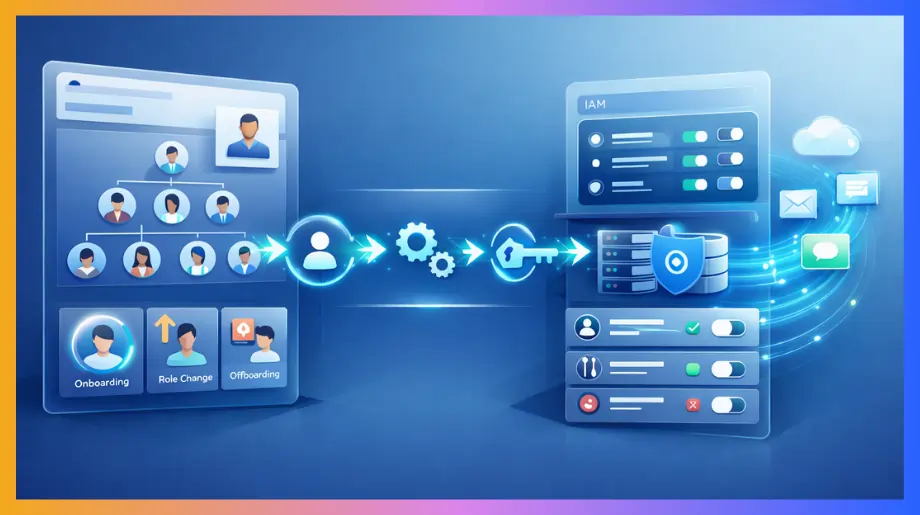

Most organizations do not struggle with access because of lack of tools. They struggle because identity is not tied to real employee data. HR updates happen in one place while access decisions happen somewhere else. Over time this gap creates delays, inconsistencies and security risks.
IAM solutions that integrate with HRIS systems close that gap by linking identity directly to HR events. However access only becomes timely and accurate when it is supported by clean HR data, clearly defined roles, and event driven automation. This is what makes it scalable in real environments.
Key Challenges Organizations Face Without IAM–HRIS Integration
When HR and IAM are not connected, access management becomes inconsistent over time. Delays in provisioning and deprovisioning occur because updates in HR systems do not automatically reflect in access controls.
This leads to mismatched permissions, inactive accounts remaining active, and gaps in access visibility. As a result, access does not accurately reflect current employee roles, which increases operational inefficiencies and audit risk.
Manual provisioning creates delays and inconsistency
In most companies this is where things start breaking. HR updates employee records but IAM does not react automatically. IT teams have to step in and handle access manually. This creates a gap between what should happen and what actually happens. Over time this gap becomes the source of delays and mistakes.
- Delayed onboarding. New employees often join without proper access. They wait for email tools or internal systems while IT processes requests. Managers follow up again and again which wastes time on both sides.
- Inconsistent access. Access depends on who is handling the request. One admin may give full access while another may restrict it. Employees in the same role end up with different permissions.
- IT workload pressure. Every access request and change turns into a ticket. IT teams spend hours on repetitive tasks instead of focusing on security improvements. As the company grows this pressure keeps increasing.
Poor offboarding leads to serious security risks
Offboarding looks simple on paper but in reality it often fails without integration. HR updates the exit but systems do not react instantly. IT has to manually remove access from multiple tools. In fast moving environments this process gets delayed or incomplete.
- Lingering accounts. Employees leave but their accounts remain active. Sometimes this lasts for hours and sometimes for days. These inactive accounts can be misused if not tracked properly.
- Missed applications. Modern companies use many SaaS tools. During offboarding some access is removed but not all. Tools outside the main system are often ignored.
- Delayed deprovisioning. Even when IT acts there is always a delay between HR update and access removal. Systems are not synced in real time.
Role changes create access sprawl
Employees keep moving across teams and roles. But access systems do not update with the same speed. Old permissions stay while new ones get added. Over time this creates a messy access structure. This issue is often ignored until it becomes a serious audit problem.
- Privilege creep. Users keep collecting access as they move roles. Old permissions are rarely removed. This results in users having more access than they actually need.
- Weak role mapping. Job roles are not clearly linked to access policies. Access decisions depend on manual judgment instead of structured rules.
- Audit complexity. During audits teams struggle to explain access decisions. There is no clear mapping between role and permissions.
Core Benefits of IAM Solutions That Integrate with HRIS
When HR becomes the source of truth, access stops drifting. Every hire role change or exit pushes a clear signal and IAM follows that signal. Teams stop relying on memory or tickets. They start relying on data that stays in sync.
HR-driven provisioning IAM brings that shift where access mirrors real org structure without constant follow up.
Automated lifecycle management with real time control
After integration, identity lifecycle management becomes automated and driven by HR events. Access changes no longer depend on manual IT actions. Instead, updates in HR systems trigger workflows that handle provisioning and deprovisioning based on defined rules. This reduces delays and improves consistency across teams.
- Event driven provisioning. When a record is created or updated in HR, the system triggers account creation and maps access based on role definitions. In most environments this happens in near real time or through short sync intervals, which reduces onboarding delays and ensures users receive appropriate access early.
- Event driven deprovisioning. Exit events in HR trigger access removal across connected systems. While timing may depend on system design, this approach significantly reduces the gap between employee exit and access revocation, lowering the risk of inactive accounts remaining active.
- Dynamic role updates. Role changes in HR trigger re-evaluation of access. Permissions linked to previous roles are removed and new access is assigned based on current responsibilities. This prevents accumulation of unnecessary access over time.
Stronger security and reduced risk exposure
Security improves because decisions become rule based instead of person based. The same logic applies every time. Variation drops and so do mistakes.
- Least privilege enforcement. Access is attached to role definitions and not individual requests. In real environments this keeps permissions closer to actual job needs. Users stop collecting access that they do not require.
- Elimination of orphan accounts. Accounts that lose their link to HR data can be identified and removed through automated workflows. When integrations are properly configured, this significantly reduces the number of inactive accounts that remain usable and lowers a common security risk.
- Consistent policy enforcement. The same access rules apply across departments and regions. Admin preference no longer changes outcomes.
Improved efficiency and operational scalability
Benefits show up in workload and speed. Coordination effort drops and execution becomes smoother.
- Reduced manual workload. Access creation updates and removals move into workflows. Ticket volume drops because common requests no longer need approval chains. IT time shifts toward improving controls instead of maintaining them.
- Faster onboarding experience. New hires enter with accounts aligned to their role. There is no gap between joining and working. Managers do not need to step in for basic setup.
- Scalable access management. Growth does not add the same level of operational overhead. When hiring increases the system handles volume through rules.
Better compliance and audit readiness
Compliance becomes a byproduct of structure. When data and actions stay aligned, evidence becomes easier to produce.
- Complete audit trails. Every change links back to an HR event or a defined rule. During audits teams can trace decisions without rebuilding history. Preparation time reduces and responses stay clear.
- Policy based governance. Access follows documented rules that map to roles and departments. Intent behind permissions becomes easier to show.
- Centralized visibility. Identity data and access states are visible in one system view. Teams can verify current access without stitching reports from multiple tools.
5 Best IAM Solutions IAM Solutions That Integrate with HRIS Systems
When companies move toward HR connected identity systems they do not just need features. They need tools that actually sync with HR data and react to employee changes in real time. The tools below are used widely because they support joiner mover leaver automation and handle real lifecycle events without manual gaps.
Each one solves the same problem but in a slightly different way depending on company size, stack and complexity.
1. Okta
Okta is commonly used in SaaS heavy environments where multiple apps need centralized control. It focuses on strong integrations and lifecycle automation. Teams choose it when they want flexibility across many tools.
- Strong HR driven provisioning. Okta connects HR systems with business applications so identity changes flow automatically. Hiring, role changes, and exits reflect quickly across systems. It also supports standards like SCIM for automated provisioning, which helps ensure consistent and scalable access management across applications.
- Lifecycle automation focus. It handles onboarding, role changes, and offboarding through workflows tied to HR events. Access stays aligned with employee status without constant monitoring.
- Wide integration ecosystem. Okta supports a large number of SaaS integrations. Teams can connect most of their tools without heavy custom work.
2. Infisign
Infisign is designed to address modern identity challenges where traditional IAM approaches may fall short. Instead of adding layers of complexity, it aims to simplify identity management through a zero trust and passwordless approach.
The platform focuses on enabling identity to flow from HR data to access control with minimal friction. This makes it suitable for organizations looking to improve IAM for employee lifecycle management.
- Fast HRIS integration. Infisign supports integration with HR systems and directories without heavy setup or custom engineering. It can connect across cloud, on prem, and legacy applications, which helps reduce common compatibility challenges. Teams can sync identity data more efficiently and avoid extended deployment timelines often seen in IAM projects.
- Clean lifecycle automation. Infisign supports provisioning and deprovisioning through event driven workflows tied to HR updates. When a user joins, moves, or exits, access can be updated automatically based on defined rules. It also supports just in time provisioning, which helps keep access aligned with current needs and reduces over assignment.
- Low operational friction. The platform is designed to reduce IT workload by automating repetitive identity tasks and access decisions. Features such as automated lifecycle workflows and intelligent access controls can reduce reliance on manual tickets and corrections.
- Zero trust and passwordless foundation. Infisign supports passwordless authentication and aligns with zero trust principles. It can reduce risks such as phishing and credential misuse while improving user experience through stronger and more flexible authentication methods.
3. Microsoft Entra ID
Microsoft Entra ID fits naturally in organizations already using Microsoft services. It connects identity with Azure and Microsoft 365 environments. It is often used in hybrid setups where cloud and on prem systems both exist.
- Native HR system integration. Entra supports direct integration with HR systems like Workday. Identity changes in HR trigger account creation updates and disable actions automatically.
- Built in lifecycle workflows. It provides automated provisioning and access updates across connected systems. This reduces manual intervention and improves consistency.
- Strong enterprise ecosystem. It integrates deeply with Microsoft tools and services. Organizations using Microsoft stack do not need heavy customization.
4. SailPoint
SailPoint is used in environments where governance and compliance matter heavily. It goes deeper into identity control compared to basic IAM tools. Large enterprises often use it to manage complex access structures.
- Advanced identity governance. SailPoint gives detailed visibility into who has access and why. It supports policy enforcement across multiple systems.
- HR system connectivity. Integration with HR platforms ensures identity data stays updated. Access decisions align with employee roles from the start.
- Insight driven access decisions. The platform analyzes access patterns to highlight risks. Teams can review and adjust permissions based on real usage.
5. JumpCloud
JumpCloud combines identity and device management into one system. It is often used in companies managing different operating systems and distributed teams. It focuses on simplicity with strong control.
- Unified directory platform. JumpCloud manages users' devices and access from one place. Teams do not need separate tools for identity and device control.
- Lifecycle automation support. It automates onboarding and offboarding processes based on identity changes. Access updates happen without manual steps.
- Supports zero trust security models. The platform supports zero trust security models where access requests are verified based on defined policies. Users and devices can be validated before granting access, which helps strengthen overall security posture.
How to Choose the Right IAM Solution for HRIS Integration
Choosing an IAM tool sounds simple until you actually start doing it. Most tools look powerful in demos. Real problems show up after implementation. You realize access is not syncing properly or workflows need constant fixing.
That is why you need to think in terms of how identity will actually flow from HR to systems. That is the core of IAM HRIS integration where HR triggers everything and IAM follows without delay.
Start with HR as the source of truth
If HR is not the starting point your system will always feel broken. Identity will live in multiple places and nothing will stay aligned. You need to fix this before even comparing tools.
- HR driven identity model. The system should treat HR as the main source of employee data. When HR updates something access should change automatically. If IT still has to step in then the model is not working properly.
- Near real time or event driven sync. Systems should support event driven updates or short sync intervals. Fully real time sync is not always required but long delays or infrequent batch updates can create inconsistencies in access.
- Support for lifecycle events. The tool should already understand joiner mover and leaver flows. You should not have to build everything from scratch. If the lifecycle needs custom work every time it will not scale.
Evaluate integration depth not just availability
Almost every IAM tool claims HR integration. The problem is most of them only connect at a surface level. That is not enough when things get complex.
Most IAM and HRIS integrations rely on standard protocols and interfaces to ensure reliable data flow across systems. SCIM is commonly used for automated provisioning and deprovisioning so identity data stays consistent across applications.
SAML and OIDC are used for authentication and single sign-on which helps maintain secure and seamless access.
APIs and webhooks support event driven communication so changes in HR systems can trigger updates in IAM without waiting for scheduled sync cycles.
- API first architecture. A strong system allows flexible data flow through APIs. This matters when you connect multiple systems and need them to stay in sync. Without this integration becomes rigid and breaks easily.
- Pre-built connectors. If your HR system is already supported things move faster. You avoid long setup cycles and reduce chances of errors. Custom integrations take time and usually need constant maintenance.
- Event driven workflows. Good systems react when something changes. They do not rely only on scheduled updates. When HR updates a role access should update through event driven triggers or short sync intervals depending on system design.
Check role and access modeling capability
This part decides whether your IAM system will actually work or just look good. Many companies ignore this and regret it later.
- Role based access control. Access should be linked to roles not individuals. When roles are clear access becomes predictable. Without this every request turns into a manual decision.
- Granular access definition. Broad access groups create risk. You need control at a detailed level so users only get what they actually need.
- Dynamic role updates. When someone changes role access should change automatically. If old permissions stay then your system slowly becomes messy.
Assess scalability and real world usability
Some tools work fine in small setups but struggle as things grow. You need to think ahead before choosing.
- Scalability with growth. The system should handle more users and apps without slowing down. You should not need to redesign everything when the company scales.
- Ease of use for IT teams. If the tool is too complex your team will avoid using it properly. Simple systems get adopted faster and managed better.
- Support for hybrid environments. Most companies are not fully cloud. You may have legacy systems as well. Your IAM tool should handle both without creating extra work.
Validate security and compliance capabilities
At the end IAM is about control. If security features are weak everything else becomes risky.
- Multi factor authentication support. Strong authentication is a basic requirement now. Systems should support MFA or passwordless methods. This protects against common attacks.
- Audit and reporting features. You should be able to see who has access and why. During audits this saves a lot of time. Without clear data teams struggle to answer simple questions.
- Policy enforcement consistency. Rules should apply the same way everywhere. If policies behave differently across systems, gaps will appear. Consistency is what keeps control strong.
Best Practices for Implementing IAM with HRIS Integration
Implementation is where things either start working smoothly or start breaking silently. Most teams think once the tool is selected the hard part is done. Reality is different. Problems usually come from unclear data, weak role design or poor coordination between HR and IT.
If you keep identity tied to HR events and move step by step the system stays stable and predictable. That is how IAM HRIS integration actually delivers value.
- Audit existing access. Before changing anything you need to see the current state. Check who has access to which systems and why. You will usually find extra permissions and inactive accounts.
- Align HR as source. HR should control identity data. When someone joins, moves or leaves the system should follow that change automatically. If access still depends on tickets or emails then alignment is missing.
- Automate lifecycle flows. Manual provisioning always creates delays and mistakes. Access should be created, updated and removed through workflows tied to HR events. This removes dependency on IT for routine changes and keeps timing accurate.
- Design role based access. Roles should reflect actual work, not just titles. When roles are clear, access decisions become simple. Without this every request becomes a manual judgment which creates inconsistency.
- Adopt phased rollout. Trying to connect everything at once creates confusion. Start with important systems and test how flows behave. Once stable, expand to other tools. This approach reduces risk and makes issues easier to fix.
- Enforce least privilege. Users should only have access required for their role. Extra permissions increase risk without adding value. Keeping access limited also makes audits easier to handle.
- Enable strong authentication. Basic login is not enough anymore. Use multi factor or passwordless methods to protect accounts. This reduces the chances of credential misuse especially in remote environments.
- Monitor and review access. Identity systems need regular attention. Check access patterns and remove anything that is no longer required.
- Integrate across systems. IAM should connect with all major systems, not just a few. When everything is linked, access updates happen automatically.
Common Mistakes to Avoid in IAM–HRIS Integration
Most problems do not come from the tool. They come from how the system is set up in the beginning. Teams rush integration or skip basic steps and then spend months fixing issues later. If you avoid these mistakes early your system stays clean and predictable.
- Ignoring data quality. Many teams connect HR and IAM without fixing HR data. Job titles are inconsistent. Departments are unclear. Reporting lines are messy. When this data flows into IAM access gets assigned incorrectly and the system becomes hard to trust.
- Manual lifecycle dependency. Some companies still rely on tickets or emails for access changes. This creates delays and things get missed. A user leaves but access is still active or a new hire waits for tools. Without automation these gaps keep repeating.
- Weak role design. Access is often given directly to users instead of through roles. At first it looks easy but over time it becomes messy. Users keep collecting permissions and no one knows what is actually required. This creates risk and makes audits harder.
- Siloed HR and IT teams. HR updates employee data but IT handles access separately. When both teams are not aligned the system breaks in small ways. Changes do not flow properly and manual fixes increase.
- No continuous monitoring. Many teams think the job is done after setup. Over time access changes and new apps get added. If no one reviews the system regularly, issues start building again.
Building a Secure Identity Foundation with HRIS-Integrated IAM
A strong identity system does not come from tools alone. It comes from clean HR data, clear roles and automated flows that stay aligned with employee changes. When identity follows real events access stays accurate and risk stays controlled.
Over time this foundation reduces manual work, improves security and supports scale without breaking systems.
Built for teams that want identity to run without friction
The right approach focuses on removing delays and reducing manual effort instead of adding more layers. It connects HR events directly with access decisions so everything stays in sync without constant monitoring.
Systems designed this way handle lifecycle changes smoothly and keep access aligned with real roles. They also reduce operational load while improving security posture.
- Passwordless authentication. Eliminates passwords using biometric login and device based verification for secure access.
- HR driven provisioning. Syncs identity from HR systems with real time automation for lifecycle events.
- Zero trust security model. Verifies every access request using continuous authentication and contextual signals.
- Lifecycle automation engine. Manages joiner mover leaver flows with event based workflows and instant updates.
- Universal integration support. Connects SaaS on prem and legacy apps using API first architecture.
- AI driven access control. Adjusts permissions dynamically using behavioral insights and usage patterns.
Stop managing access manually. Connect HR with identity and remove delays and risks. See how automation improves control and security in real workflows. Book a demo and experience it live.
FAQS
What is HR-driven identity management?
HR driven identity management means the HR system acts as the source of truth. Employee events trigger access changes automatically. Identity stays aligned with real roles without manual intervention or delays.
How does IAM automate the joiner-mover-leaver (JML) lifecycle?
IAM listens to HR updates and triggers workflows. New hires get access. Role changes update permissions. Exits remove access instantly. This ensures the identity lifecycle runs without manual dependency or delays.
What features should you look for in IAM solutions for HRIS integration?
Look for real time sync, strong API integration, role based access, lifecycle automation, and audit logs. The system should support event driven workflows and scale easily across multiple applications and environments.


