


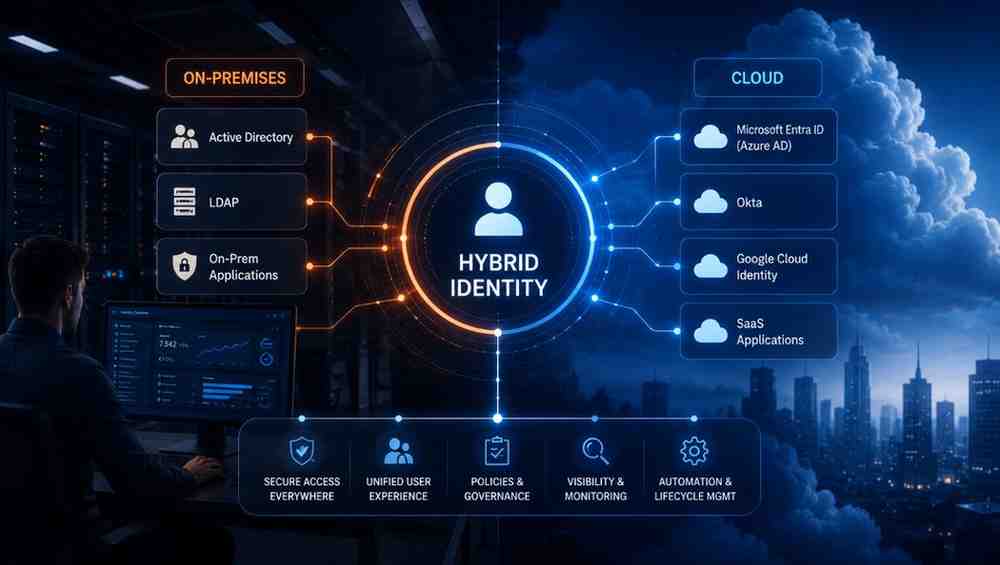

Most businesses today run on a mix of local servers and cloud apps. This blend creates a complex landscape where managing users becomes a massive hurdle. You might wonder, what is a hybrid identity strategy and why does it matter?
It acts as the bridge that connects your office-based systems with modern web tools. Instead of managing separate logins for every platform, you create one central flow for your staff. This approach keeps your operations fast and safe while letting your team work from any device.
What Hybrid Identity Actually Means
Hybrid identity is an identity architecture that connects on-premises identity systems with cloud identity services so users can access both local and cloud resources using a consistent identity. It allows organizations to integrate on-premises identity systems with cloud services so users can access both environments while administrators manage identities more consistently.
- Unified Credential Management. Maintaining a primary identity directory allows organizations to centrally manage user identities while authentication and access decisions can be enforced consistently across connected applications.
- System Synchronization. This process ensures identity changes made in the on-premises directory are synchronized to supported cloud services according to the configured synchronization schedule. Using standards such as SCIM helps automate user provisioning and deprovisioning across supported applications, reducing manual administration and improving consistency.
- Controlled Access Points. Getting the best of both worlds happens by keeping heavy workloads on local servers while taking advantage of the speed that cloud tools offer.
Why Businesses End Up With Hybrid Identity
Most companies do not plan for a split setup since managing two worlds is naturally tricky. It usually happens as a team grows and adds more tools to keep up with the pace.
Legacy That Cannot Retire
Some older programs act like the foundation of a house. They have been there for years and hold so much important data that moving them would cause the whole thing to crash.
- Keeping Things Running. Staying with what works prevents the massive headache of trying to change tools that are already doing a good job.
- Saving Money. Sticking with what is already paid for lets the team put money into new projects instead of wasting it on moving systems.
SaaS No One Approved
Staff members are always looking for ways to get tasks done faster. Sometimes they find a cool app online and start using it for work before the bosses even know it exists. This creates a mess where company info is hidden away in places.
- Keeping Data Safe. Bringing these apps under one roof lets leaders make sure that company files are not floating around in places they should not be.
- Managing Access. It makes life easy because you can control who uses what tool from one spot instead of guessing if a person still has a login.
Growth Through Acquisition
When one company buys another it is like two different teams trying to merge their workflows. Both sides have their own way of doing things and their own sets of digital keys.
- Working Together Fast. Connecting these systems lets the new team jump right into the workflow without waiting for a long changeover.
- Staying Stable. Giving people time to keep using what they know keeps everyone comfortable while the big picture changes happen behind the scenes.
A Workforce That Went Remote
Companies had to find a way to take their stuff that was locked behind office walls and open it up to the world so staff could reach it from home.
- Easy Logins. Giving people one way to log in makes sure they can get to their work quickly whether they are at a coffee shop or a kitchen table.
- Staying Secure Everywhere. Making sure the same security rules apply no matter where someone is sitting helps keep everything safe without making it hard for people to do their jobs.
How Hybrid Identity Actually Works
When a user signs in, authentication is handled according to the organization's hybrid identity configuration. This includes methods like Password Hash Synchronization or Pass-through Authentication or federation.
Synchronization
Synchronization services periodically detect directory changes. They synchronize supported identity information to connected cloudservices.
- Consistent Data Updates. Automatic syncing ensures that information remains uniform across the entire network without any manual work.
- Real Time Accuracy. Identity updates are synchronized according to the configured synchronization process. Propagation time varies depending on the platform or configuration.
Provisioning and SCIM
Provisioning is the act of giving a person the right keys for the right doors. When a new person joins the team the system creates their accounts in all necessary apps without anyone needing to set them up by hand.
- Automated Account Setup. Automated provisioning can create user accounts. It also assigns application access based on organizational policies which reduces manual onboarding work.
- Standardized Communication. Standard protocols allow different apps to accept new users and update access permissions without needing custom code for every single platform.
The Authentication Bridge
The authentication bridge handles the actual login request. It checks if the person is who they say they are by verifying credentials against the local source of truth. Once the system confirms the identity it creates a secure token that tells the cloud apps to grant entry.
- Centralized Verification. Every login request hits one secure point that validates the user before letting them into any cloud software.
- Secure Token Handling. Modern authentication protocols allow applications to rely on security tokens. These protocols avoid handling user passwords directly to reduce password exposure.
Where Hybrid Identity Quietly Breaks
When your local server and cloud apps do not talk perfectly every single minute you end up with messy data and security risks that stay hidden until something fails.
Many organizations value automated synchronization. It reduces manual identity management and helps maintain consistent user access across systems.
Accounts That Outlive the Employee
Sometimes a person leaves the team but their account in a cloud app stays active because the sync process missed that specific tool. These accounts are dangerous because they act as open doors for anyone who knows the old login details.
- Residual Access. Accounts remain active in apps that get forgotten during the exit process.
- Audit Gaps. These accounts increase security risk. They remain available for misuse if they are not disabled or removed promptly.
Two Directories, Two Truths
When your local directory and your cloud apps have conflicting info you lose your main source of truth. One system might think a user is active while another thinks they are gone.
- Conflicting Permissions. Having two different sets of rules for one person leads to inconsistent access where they can enter some apps but get blocked from others.
- Operational Friction. Disjointed records make it impossible to get a clear picture of your user base which leads to messy management.
Connectors That Break Silently
Connectors are the invisible pipes moving data between your servers and the cloud. If a pipe gets clogged or breaks you might not know it until someone cannot log in.
- Hidden Data Loss. A broken connector stops updates from flowing so new users might wait days to get access to the tools they need.
- Delayed Troubleshooting. Many identity platforms provide synchronization monitoring and alerts. Some failures may still require administrators to investigate logs or connector health.
Passwords Living Everywhere
If you rely on apps that store their own passwords instead of using your central directory you lose control. Every time a user sets a separate password in an app you lose the ability to force a secure change or lock them out instantly.
- Security Blind Spots. Apps that manage their own logins sit outside your primary security rules and become weak links in your setup.
- Credential Fatigue. Forcing people to manage different passwords for every single tool makes them use weaker codes that are easier to guess.
Access No One Remembers Granting
Over time users collect access to apps they stopped using months ago. Without a regular review process this access just piles up until someone has the keys to half your systems without needing them.
- Permission Creep. Small additions of access over time turn into a massive footprint that nobody actually monitors or needs.
- Increased Attack Surface. Every extra app a user can access is another path for a potential threat so reducing those paths is vital for stability.
What to Look for in a Platform That Manages Hybrid Identity
A strong platform removes the stress of managing two different worlds by acting as the glue that keeps your team connected and secure. It should feel like it was built for your specific needs instead of forcing you to change how you work.
Standards Based Provisioning
Using open standards such as SCIM, SAML, and OpenID Connect helps reduce vendor lock-in. This improves interoperability between identity platforms. You want a system that talks to every app using the same language which makes adding or removing tools incredibly easy. This flexibility keeps your options open so you never feel trapped when you decide to change your software stack.
- Universal Compatibility. Supporting standards such as SCIM enables automated provisioning. It works with many modern applications that implement the protocol.
- Future Proofing. Choosing a system that follows global standards means your setup stays ready for whatever new tools your team might pick tomorrow.
Pre Built Integration Depth
A platform should come with a massive library of ready to use connections for the apps your team already loves. You should not have to spend weeks writing code or building bridges just to get your email or project tools talking to your directory. Platforms with pre-built integrations can significantly reduce deployment effort. Administrators still configure authentication, mappings, and access policies.
- Fast Deployment. Having deep integrations ready to go means you can bring new apps into your secure orbit in minutes rather than months.
- Reliable Performance. Pre-built connectors undergo constant testing so you know your access flows will stay stable even when the apps themselves get updates.
Unified Authentication
Managing logins should never be a burden for the people on your team. A single secure gateway where everyone confirms who they are makes the experience clean and consistent.
- Simplified User Experience. Giving staff one way to log in across the board stops the frustration of juggling passwords and gets them to their work faster.
- Stronger Security. Centralized authentication enables organizations to apply MFA. It also enforces other access policies consistently across supported applications.
Automated Lifecycle
A smart platform handles the entire path of a user from their first day to their last without any manual clicks.
- Instant Onboarding. New hires get access to all their tools automatically on day one which creates a great first impression and saves time for your team.
- Clean Offboarding. Automatically cutting off access the moment someone leaves ensures your company data stays locked down and prevents old accounts from becoming holes in your security.
Full Audit Visibility
Having a clear view of every login attempt and permission change lets you catch errors before they become massive problems.
- Total Transparency. Detailed logs provide a clear trail of who accessed what and when which helps you prove that your security measures are working.
- Rapid Problem Solving. Having full visibility lets your team trace issues back to the source in seconds so you can maintain a smooth workflow for everyone.
Hybrid Identity Is a Foundation Decision
When you prioritize a smooth flow of data between your local environment and the cloud you create an environment where people can focus on their actual work rather than fighting with logins.
Simplifying the Hybrid Reality
As businesses look for ways to manage these connections, platforms like Infisign Unified provide a way to bring order to the chaos without adding complexity.
- Intelligent Syncing. Keeps your user data aligned across local directories and cloud apps to ensure the right people have the right access at all times.
- Seamless Lifecycle Management. Handles the transition of users from their first day to their last so that no access permissions are ever left open by accident.
- Standardized Security. Uses industry-standard identity protocols such as SAML, OpenID Connect, OAuth 2.0, and SCIM. These integrate existing infrastructure with cloud applications.
- Centralized Oversight. Gives a clear view of all identity traffic so you always know what is moving through your systems without needing to dig through scattered logs.
Stop wasting time on manual identity sync issues. See how Infisign brings your local and cloud systems together in one view. Book a short demo to talk through your specific setup.
FAQ
What's the difference between hybrid identity and just running Active Directory alongside cloud apps?
Running them side by side means you manage two separate login systems, causing a huge mess. Hybrid identity connects them into one single system, giving your team one easy login.
Is hybrid identity a temporary migration phase or a permanent state?
For most companies, it stays as a permanent setup. They keep old, reliable local systems running for heavy tasks while adding fast cloud apps to give teams the best tools.
What are the biggest security risks unique to hybrid identity?
The biggest risks are broken syncs and forgotten accounts. If local systems stop talking to the cloud, old accounts stay open, letting bad actors easily walk into your company network.
Do we have to replace Active Directory to manage hybrid identity well?
No, you do not need to replace it. A good setup builds on top of your current Active Directory, linking it securely to new cloud tools without any extra hassle.


