



Selecting a user login system often leads development teams to evaluate Auth0 vs Firebase for their cloud architecture. Both platforms manage basic user accounts well but serve entirely different product trajectories. One option focuses on fast mobile setups and low initial fees. The other provides deep corporate security policies for large networks.
The right choice depends on your target market and your long-term budget. It also depends on your engineering requirements. Reviewing how these two systems handle active users helps ensure you deploy an identity framework that grows with your business application.
Auth0 vs Firebase Detailed comparison
Adding a user login system to web or mobile apps often leads teams to choose between Auth0 and Firebase. Both platforms handle basic user accounts well but serve very different product needs. Selecting the right tool depends on whether your priority is a fast setup with Firebase authentication or a platform built for complex security rules.
Which One Actually Fits What You're Building
Choosing between these two platforms comes down to your business model. Your choice will affect your development speed and your upcoming cloud bills. It will also impact your long-term MAU pricing structures.
When Auth0 Is the Best Choice
When you build software for businesses, your main goal is to make signing in simple, professional, and safe. Auth0 SAML integration provides built-in support for enterprise federation through SAML, OIDC, and other protocols to give your corporate customers exactly what they need without building complex systems from scratch.
Here is how this approach supports your customers:
- Easy Access. Instead of creating a new password, employees can use the same login details they already use for their office computer. This helps them get to work right away.
- Automatic Cleanup. When a person leaves their job, access can be automatically revoked through the customer's identity provider when federation is properly configured. You do not have to manage a list of who is allowed in or out.
- Trusted Safety. Big companies care deeply about security. Because they use their own systems to verify people, they feel much more comfortable trusting you with their work.
- No Extra Work. You do not need to write new code for every client. The system connects to their existing office tools automatically.
- Professional Look. Offering a "company login" button makes your software look high-quality, which helps you win over more business customers.
When Firebase Is the Best Choice
Firebase is a great fit for mobile apps and early startups. It operates as part of a larger cloud system, making it the natural pick if you use Firebase google cloud authentication packages. It helps you launch quickly without dealing with a heavy configuration process.
- Rapid market setup. Building a quick prototype requires simple workflows. Firebase handles basic email sign-ups and social media logins easily. It uses pre-built interface tools to get your app running fast.
- Zero cost startup. New projects need to keep monthly bills low. The platform offers a very generous free tier. Firebase Authentication offers a generous free tier, although pricing and usage limits vary depending on the services enabled and should be verified against current Google documentation.
- Google ecosystem match. Many developers run their databases on Google Cloud. Firebase integrates natively with Firebase and other Google Cloud services. It also integrates smoothly with Flutter code frameworks.
Auth0 Features Worth Evaluating Before You Commit
Many developers report that Auth0 saves them a lot of time by handling difficult security tasks for them. Looking at their feedback, it is clear that this is a reliable way to manage how people sign in to your product.
Here is why this is a smart way to manage your users:
- CIAM Capabilities. As a leading CIAM solution, Auth0 excels at managing complex user identities.
- Secure Login Pages. You can use a ready-made sign-in page instead of building your own. This keeps private details away from your main data, which lowers the risk of information being stolen.
- Simple Updates. You can add extra steps to the sign-in process, such as multi-factor authentication, to enhance security without needing to write difficult code.
- Corporate Connections. When working with large companies that want to use their existing office accounts, you can use Auth0 enterprise SSO to connect to them instantly. This saves you from doing hours of manual setup.
- Passwordless Experience. Supporting passwordless authentication provides a modern, frictionless login experience for your users.
- Time Savings. Because the system handles passwords and accounts for you, your team can spend more time building the product instead of fixing complex security tasks.
Auth0 Limitations You Will Hit
developers note that while Auth0 is powerful it comes with certain trade offs as your project grows. Reviewing feedback from teams who have used the platform reveals a few common challenges you should keep in mind.
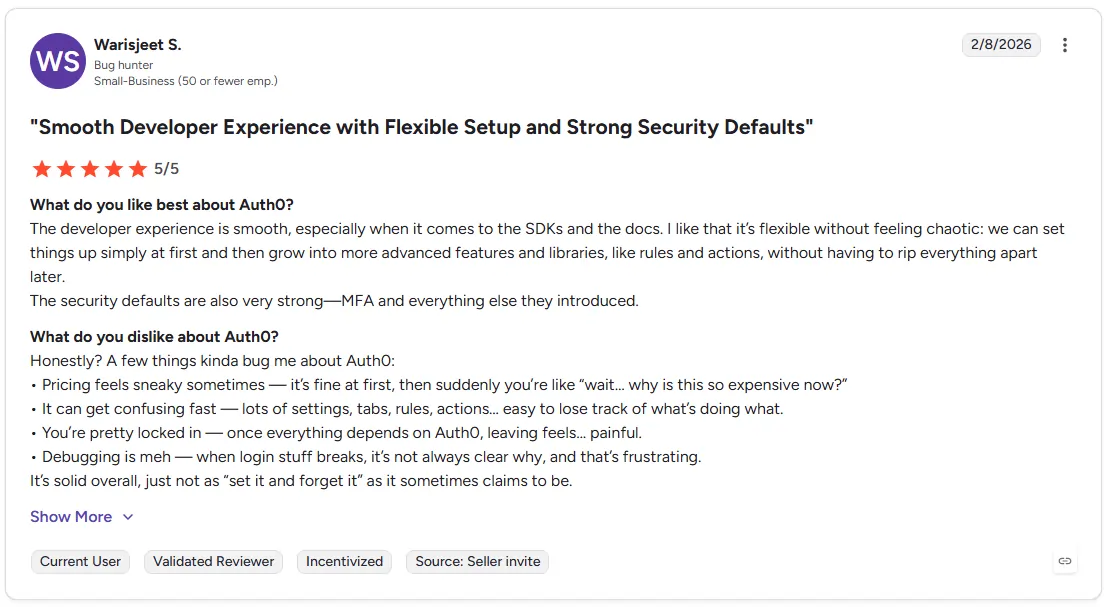
- Unexpected Price Jumps. Many users find that costs rise quickly when they outgrow the basic starter plan. Moving to advanced settings often leads to sudden price increases that can be hard to predict.
- Remote Testing Requirements. The system relies on its own servers to run. This means your team cannot easily test their code offline and must stay connected to the cloud to perform standard security checks.
- Restricted Business Features. Features needed to connect with large corporate clients are often locked behind the most expensive plans. Some enterprise capabilities, such as advanced federation and organization management features, may require higher-tier plans.
Discussions within the developer community suggest that building an authentication system from scratch is often a time-consuming task. While many developers find Auth0 very easy to set up, they also note that it can become expensive as your user base grows.
Firebase Features Worth Evaluating Before You Commit
Many developers rely on Firebase for its speed when launching new projects. Based on an analysis of developer feedback and platform capabilities it is a popular starting point for consumer apps that need a fast setup.
- Integrated Ecosystem. Firebase links your login system directly with your storage and backend tools. This allows you to share user information across your entire project without needing to build bridges between different services.
- Massive Scaling. Because it runs on Google infrastructure it handles sudden spikes in traffic easily. Your login gates remain stable even when large numbers of users try to sign in at the same time.
- Ready-Made Interface Components. You do not need to spend time designing custom sign-in screens for every device. The platform provides pre-built components to handle basic login needs for both web and mobile users.
- Fast Development. Since it is designed for rapid prototyping it allows your team to focus on core product features rather than spending time on the basics of identity infrastructure.
Firebase Limitations You Will Hit
Even though Firebase is easy to start with, many developers find it gets tricky as their business gets bigger. Reviews show that it can become a roadblock when you need more advanced features.
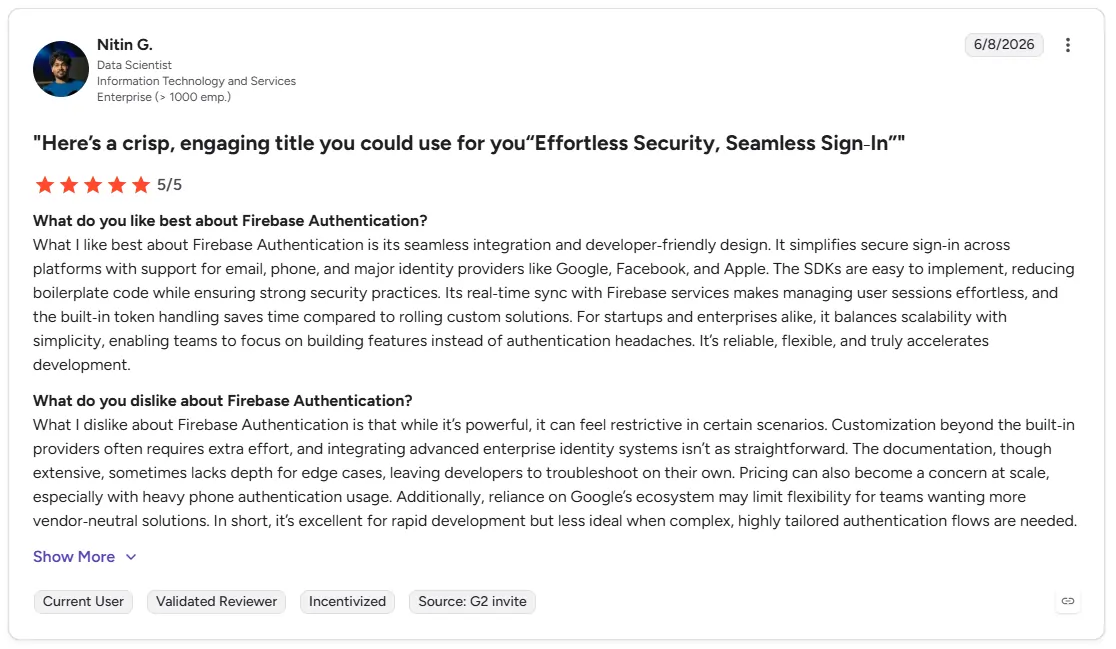
- Surprise Bills. It is hard to guess how much your monthly bill will be. As more people use your app the costs for data and sign-ins can jump up unexpectedly.
- Missing Business Tools. If you need to let big companies use their own office sign-ins to access your app Firebase Authentication alone may not be sufficient. Organizations commonly use Google Cloud Identity Platform to add enterprise identity capabilities.
- Connection Problems. Sometimes company security systems block the links that Firebase uses. Firebase Authentication environments may experience network restrictions within certain corporate firewall settings which requires migrating to a custom domain setup earlier than planned.
- Security Gaps. As your app grows you might need stronger protection or special ways to manage different groups of users. As identity requirements become more complex, organizations may choose to extend Firebase with Google Cloud Identity Platform or adopt a dedicated identity platform.
As per community discussions, remember that Firebase counts a Monthly Active User (MAU) as anyone who logs in at least once a month. Also, note that SMS verifications consume OTPs during every login, which can lead to unexpected costs.
Auth0 and Firebase Pricing Breakdown
Choosing between Auth0 and Firebase depends on how your project grows. Based on the platform details, here is how their pricing models compare for managing customer identity.
Key Takeaways
- Free Starting Point. Firebase offers a generous starting point by allowing up to 50,000 monthly active users for free under its No-cost Spark plan. Auth0 provides a free tier, although limits and included features may change over time.
- Cost Structure. Auth0 operates on a subscription model where you select a tier, such as Essentials or Professional, that fits your monthly user volume. Firebase uses a Pay-as-you-go model where you only pay for usage once you exceed the free tier limits.
- Corporate Readiness. If your goal is to support Auth0 enterprise SSO and complex organizational needs, Auth0 is built to provide these tools within its premium packages. Firebase covers standard authentication, but adding advanced identity features usually requires moving to the Google Cloud Identity Platform, which involves different cost calculations.
Ready to Move Beyond Auth0 and Firebase?
Finding the right identity setup takes a bit of strategy. Most engineering teams rush into a decision because they want to launch fast. They pick a tool for their current size and completely ignore what comes next. If you plan for your long-term roadmap now, you will save months of backend changes.
You will know exactly how your data scales and what your bills will look like. Organizations evaluating long-term identity architecture may benefit from assessing unified identity platforms alongside traditional authentication providers. You will end up with a secure setup that actually fits your business goal.
A unified framework gives you full control over how users interact with your digital products. Infisign UniFed simplifies customer identity and access management by handling all external user workflows inside one central system. This approach gives your team concrete advantages as your application grows:
- Customer Single Sign On. You can connect multiple customer web and mobile apps to a single identity source. This lets buyers jump between your digital products without ever logging in twice.
- Customer Passwordless Security. The system replaces old customer security checks with modern authentication tools. Your application users can log in instantly using biometric, fingerprint scans and secure device passkeys.
- B2B Tenant and Role Management. Your product team can set dynamic customer permissions and tenant access levels instantly. You can manage regular retail buyers and large corporate business accounts from one dashboard.
- User Onboarding and Social Logins. The platform streamlines how new customers register and sign up for your product. You can launch instant social sign-ins and user creation flows without slowing down your application performance.
Stop letting complex login setups slow down your application growth. Let us show you a better way to manage external users.
Schedule a short conversation to get started!
FAQs
Can Firebase handle enterprise SSO?
Firebase Authentication does not include enterprise federation features directly. Organizations that need SAML or OIDC federation typically use Google Cloud Identity Platform, which extends Firebase Authentication capabilities.
Is there a better option than Auth0 or Firebase for B2B SaaS?
Yes, a unified setup works well for B2B. Platforms like Infisign UniFed handle both customer profiles and employee directories inside a single system to simplify your infrastructure.
Is Auth0 easy to implement?
Auth0 is relatively easy to implement for standard web apps using its pre-built Quickstarts. However, customizing the serverless actions pipeline and setting up multi-tenant logic requires advanced backend knowledge.
How does Auth0 pricing compare to Firebase
Auth0 generally uses tier-based subscription pricing, while Firebase combines free-tier usage with pay-as-you-go billing for certain services.


