


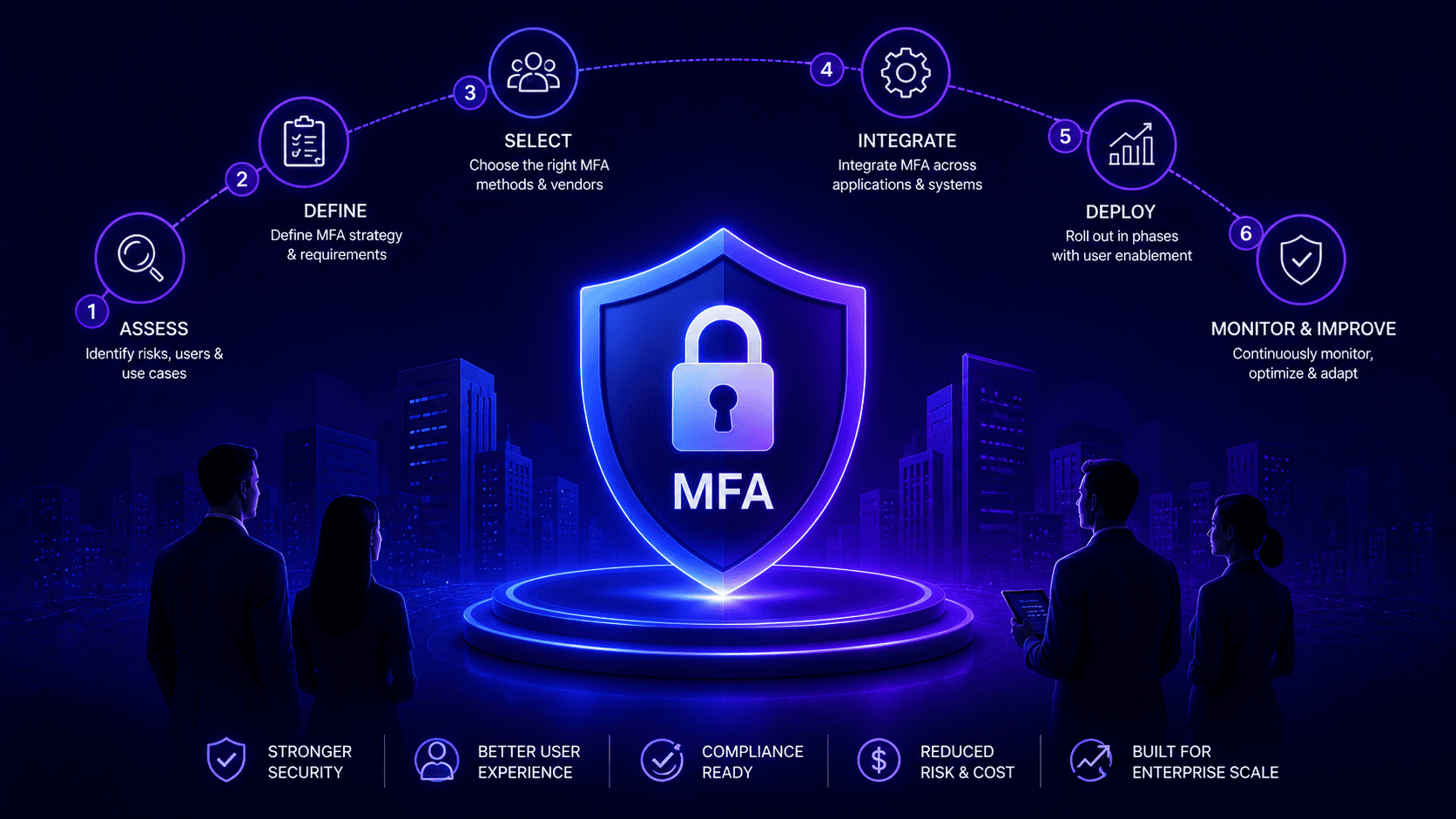

Launching enterprise security without a solid guide causes total chaos for help desks and ordinary workers. Companies must build an MFA implementation plan before day one to avoid panic.
This means finding old background scripts that break automated tasks and training regular staff ahead of time. Instead of switching everything on at once teams should start with administrators and move slowly department by department.
Testing tools early prevents unexpected issues, stops massive support queues and keeps daily work running smoothly without sudden crashes or angry bosses shutting down the entire project.
Why MFA Implementations Break After the Pilot Succeeds
Small multi factor authentication implementation tests feel easy when smart tech folks test them out because they do not mind extra steps. Things go totally wrong once thousands of normal office workers join in. People forget phones or get locked out during crazy morning hours. Help desks get flooded with panic calls and work slows down way too much.
The Human Support Bottleneck
Tech workers know how security apps work while normal staff have no clue about enterprise MFA. One random login block creates instant panic and fills up chat rooms with complaints which overwhelms the help team and makes bosses cancel the whole setup.
- Understanding Gap. Tech workers know how security apps work while normal staff have no clue about them. One random login block creates instant panic and fills up chat rooms with complaints during any MFA deployment.
- Support Overload. Help desks get crushed by so many calls and messages at once. Bosses panic when daily work slows down and force everyone to stop the MFA rollout.
Legacy System Disasters.
Old office software runs on hidden background scripts and basic passwords that nobody checks. A sudden MFA deployment without finding these hidden tools makes automated tasks fail overnight.
- Hidden Dependencies. Office networks run on old background scripts and basic passwords that nobody checks. Turning on strict security without finding these hidden tools makes automated tasks fail overnight.
- Business Halts. When automated billing and data sync tasks break down suddenly bosses have no choice but to turn off the MFA enforcement policy completely to save the business.
Practical Steps For Lasting Security Deployment
Making security work for everyone means getting ready from day one to ensure smooth MFA adoption. Companies need to list every background tool and teach regular staff well before turning on new rules.
Mapping Non Human Accounts
Checking old scripts and backup tasks stops data loss while everyone sleeps. Finding these hidden background helpers keeps daily work safe from sudden crashes.
- Inventorying Background Tools. Checking old scripts and backup tasks stops data loss while everyone sleeps. Finding these hidden background helpers keeps daily work safe from sudden crashes.
- Protecting Workflows. Fixing backend tech early keeps background tasks running without bothering regular staff during the switch.
Preparing Workforces And Workflows
Giving people simple guides helps them learn new login steps without getting stressed out. Setting up special help desks keeps trouble tickets low and makes the new security stick around for good.
- Clear Training Guides. Giving people simple guides helps them learn new login steps without getting stressed out. Staff stop feeling mad when they know what is coming on their screens.
- Managing Support Channels. Setting up special help desks keeps trouble tickets low during busy times. Planning for human stress early makes the new security stick around for good.
What Your MFA Implementation Plan Has to Decide Before Phase One
Starting a phased MFA rollout means making tough choices about tokens and backup plans before day one. Picking the right security tool depends entirely on what kind of work people do every day. Factory workers need simple options while finance teams require maximum protection. Setting clear rules early stops endless arguments and keeps things running smoothly.
Choosing Tools And Emergency Rules
Figuring out how people will log in stops massive confusion later on. Leaders must decide if staff use phone apps or physical keys based on their daily jobs. Making a solid backup plan for lost devices keeps the team calm when emergencies happen.
- Picking Right Tokens. Matching the correct login tool to the right job keeps everyone happy. Factory staff need easy setups while money teams need heavy security.
- Emergency Access Plans. Having a clear backup method for lost keys stops panic during sudden lockouts. Leaders must write down these recovery steps before turning on any new rules.
Setting Boundaries And Budgets
Drawing clear lines around network rules and spending enough money keeps projects safe from sudden failure. Teams must agree on special rules for remote workers and make sure accessibility needs are fully met. Funding the help desk properly prevents total chaos during the launch.
- Network Rules And Access. Deciding if home networks need extra checks keeps everyone safe without slowing down work. Setting these boundaries early prevents arguments across different departments.
- Accessibility And Funding. Making sure disabled workers get proper help keeps the company fair and legal. Putting enough money into support and training guarantees the whole setup survives the pressure.
The MFA Implementation Project Plan Phase by Phase
Rolling out company security step by step keeps everything stable and running without sudden trouble. Starting with admin accounts protects the most dangerous weak spots first. Moving outward in planned waves lets teams fix small software bugs before anyone gets mad or confused.
Securing Admins And Remote Teams
Locking down high level administrator portals stops major threats right at the start. Expanding protection to remote workers blocks hackers who try to steal passwords over public web connections.
- Admin Account Lockdown. Protecting database controllers and domain administrators with powerful multi-factor authentication can significantly decrease the risk associated with privileged account takeover.
- Remote Worker Protection. Shielding people who travel or work from home neutralizes common password theft tricks. Strong checks keep outside connections safe from hackers.
Department Waves And Final Launch
Bringing in regular office workers one group at a time keeps help desks from crashing. Finishing up with public web apps and old portals wraps the whole project safely.
- Departmental Cohorts. Rolling out changes one team at a time stops support queues from exploding. Accounting and sales staff transition in slow waves to keep daily tasks smooth.
- Final Web App Security. Securing public tools and old portals finishes the project strong. Checking error logs after every step ensures the entire business stays online without downtime.
Where MFA Implementations Go Wrong and How to Handle Each One
Security rollouts often trip over simple mistakes once they grow past the small testing phase. People get mad when extra login checks pop up during urgent work. Old background tools get forgotten and break overnight. Fixing these traps early keeps the whole business safe and running without drama.
Human Friction And Communication Gaps
Annoying login prompts during busy moments make workers frustrated and angry. Explaining the reasons behind new security rules stops people from pushing back.
- Smart Risk Rules. Risk-based access policies can lower unnecessary authentication prompts when multiple signals suggest lower risk while still enforcing stronger verification when risk increases. Workers stay happy when security only steps in during unusual situations.
- Clear Campaigns. Teaching staff how modern attacks work helps them understand why verification matters. Good communication stops resentment before it starts.
Technical Blind Spots And Recovery
Forgetting about hidden background scripts leaves huge security holes open for hackers. Not having a fast recovery plan for lost devices crashes the support desk.
- Non Human Accounts. Swapping out interactive user passwords for machine-to-machine authentication options like certificates, workload identities, or properly scoped tokens helps automated tasks run smoothly during multi-factor authentication rollouts. Fixing these hidden tools keeps core systems running smoothly.
- Recovery Workflows. Setting up safe identity and access management checks for support agents stops hackers from tricking them. Fast recovery options keep employees working even if they lose their phones.
MFA Implementation Challenges in Financial Institutions
Banks and money firms deal with tough laws and smart hackers so they need top notch security. Keeping millions of customer accounts safe while moving money fast is a huge challenge. Making sure everything follows the rules without slowing down daily work is a major focus for banking for modern security teams.
- Speed And Fast Transfers. Asking for extra login steps on every money move makes things slow and annoys clients. Banks fix this by using smart risk tools that check things quietly in the background without bothering anyone.
- Old Computer Systems. Traditional banking setups were never built for modern security checks. Engineers have to build special bridge software just to connect aging mainframes with new cloud security tools.
- Strict Government Rules. Financial regulations often require organizations to adopt suitable safeguards for protecting sensitive financial data and systems alongside authentication and access management. Banks might need to decrease reliance on SMS authentication for higher-risk cases and consider robust, ideally phishing-resistant authentication methods where applicable.
- Fast Paced Trading Floors. Stock traders move at lightning speed and cannot deal with clunky login screens. Security teams must protect sensitive money accounts using specialized hardware that keeps up with the trading floor.
MFA Implementation Challenges for Healthcare Providers
Hospitals never sleep and doctors need instant access to files when treating sick people. Old medical machines and strict privacy rules make hospital security very tricky. Keeping patient records safe while letting doctors work fast through passwordless authentication removes a massive challenge.
- Emergency Room Speed. Doctors cannot waste time fighting slow login screens when someone is dying. Hospitals use tap cards or fingerprint scanners right on desk computers so staff can switch patient files in a second.
- Old Hospital Gear. Many heart monitors and scan machines run on super old software that cannot handle new security checks. Keeping these outdated machines safe without breaking them takes smart planning.
- Changing Staff. Hospitals always have temporary nurses and visiting doctors coming and going. Managing their entry passes by hand causes huge headaches unless computer systems handle it automatically.
- Privacy Rules And Tired Staff. Doctors work long shifts and get super stressed out. Security teams must lock down private medical files tightly without making work harder or more annoying for tired staff.
How to Roll Out MFA in ServiceNow Without Breaking Your Integrations
Big office help systems hook up with HR apps and auto email tools. Turning on strict login rules inside these software tools often breaks background data links and alert setups. Locking down the main system without breaking backend helpers takes smart planning and careful testing from the start.
- Fixing API Connections. Auto scripts break right away when security popups block them because computer code cannot tap a smartphone screen. Tech admins must change these background tools to use special system profiles and safe login tokens instead of normal worker passwords.
- Sandbox Testing. Trying out new security rules in a safe test zone stops sudden system crashes. Checking how background data moves early on makes sure support tickets and reports keep working without any trouble after launch.
- Network IP Rules. These platforms let admins set up special rules that skip annoying login checks for trusted server addresses. This keeps server talks smooth and fast while real human users stay fully safe behind strong login walls.
- Continuous Monitoring. Reading system logs closely right after turning on security helps catch broken background tools early. Finding broken data links fast stops major service drops across the whole support team.
What Your Identity Platform Has to Do for the Plan to Hold
The main user sign in system is the bedrock for any big security rollout and needs heavy duty tech muscle. First it must use modern web standards so every single app hooks up smoothly. Second, it needs smart risk tools that check things like location and device safety right away. Third, it must give security teams clear event logs to spot trouble instantly. Choosing a rock solid vendor and testing everything in a safe sandbox keeps the whole company safe from sudden lockouts.
- Open Standards And Risk Scoring. The login system must use standard web rules so every piece of software connects without friction. Smart risk tools check where people log in from and whether their phones or laptops are safe right away.
- Global Uptime And Logs. The vendor must promise steady service across global servers to stop company wide lockouts. Clear event logs help security teams spot weird login moves the second they happen.
- Directory Sync And Policy Builder. The system must match user accounts smoothly across cloud folders and old office networks. Flexible rule makers let admins set custom security levels based on worker jobs and device safety.
- Vendor Testing And Growth. Testing the platform in a safe sandbox proves whether vendor promises match real life use. Picking the right tech foundation early supports long term company growth without painful software changes down the road.
Build the Plan Before the Deadline Builds It for You
Waiting for a security breach or a failed audit to update company defenses creates severe operational risk. Organizations that delay preparation end up rushing fixes under intense pressure after an incident occurs. Taking control of the security timeline today protects the enterprise against financial losses and regulatory penalties. Infisign UniFed provides the right foundation to secure corporate access without disrupting daily operations.
- Employees can leverage passkeys, typically unlocked with a device PIN or biometric, to decrease password dependence and potentially lighten daily login friction.
- The platform evaluates device security and user locations automatically to prevent unexpected access blocks for regular staff.
- It integrates with existing applications while helping teams tackle legacy authentication and automation dependencies during deployment.
- Directory synchronization and automated provisioning can streamline user onboarding and offboarding by reducing manual identity management tasks where supported.
Schedule a live meeting on the Infisign demo page today to talk with our security experts and find out how straightforward modern protection can be for your entire organization. Let our team show you the best path forward for your company security roadmap.
FAQ
Why do company security rollouts usually fail?
Companies often push strict rules to everyone at once without proper testing. This floods the support desk with calls from locked workers and forces management to cancel the project.
How can businesses stop old background scripts from breaking?
Tech teams must map out all automated tasks beforehand. Updating these scripts to use secure system tokens prevents unexpected failures overnight and keeps core business software running smoothly.
What is a phased rollout and why does it help?
A phased rollout means launching security rules step by step across different departments instead of all at once. This keeps support queues small and catches software bugs early.
How does Infisign UniFed protect corporate access without annoying staff?
Infisign UniFed provides risk-based access controls and passwordless methods such as passkeys and biometrics, which can minimize password prompts when tuned for supported authentication flows.
Why do ordinary office workers push back against new login rules?
Extra login steps slow down urgent work and cause panic during unexpected lockouts. Clear communication and proper training help staff understand why these defenses matter for everyone.


