


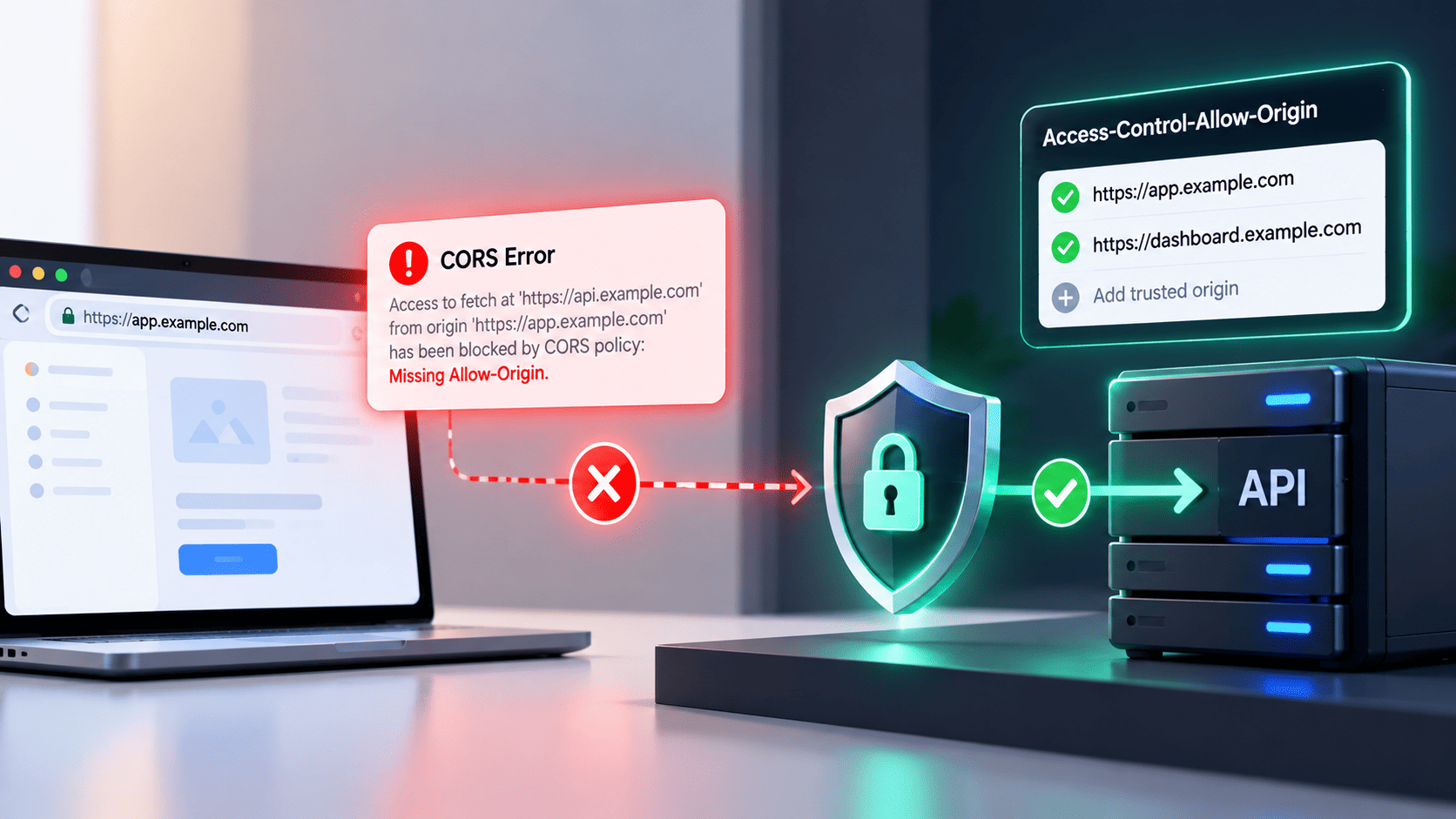

Web pages often ask other servers for data. When a browser blocks this action, you see a CORS missing allow origin error on your screen. This error happens because browsers want to keep users safe from bad websites. Fixing this problem means telling your server to send the right safety message. Turning off safety rules to hide the warning is dangerous for your website. This simple guide shows why this error pops up and how to fix it safely without making your web system weak.
What the Browser Is Telling You and What It Is Not
When a browser enforces CORS rules, it acts as a security guard by preventing websites from accessing data they are not permitted to read. The warning on your screen means the server did not send the right permission message back to the browser. It does not mean your server is completely broken or that the network connection failed.
- Browser Protection: When a browser reports a CORS error, it is enforcing the same-origin policy. For simple cross-origin requests, the request may reach the server, but JavaScript cannot access the response if the required CORS headers are missing. For requests requiring a preflight check, the browser sends an OPTIONS request first and blocks the actual request if the server does not approve it.
- Missing Safety Code: The browser looks for a special permission text before showing data. When that text is missing, the browser stops the web page from reading it. Adding the right permission text tells the browser that your web site is friendly, which becomes a key step when configuring enterprise SSO tools to manage secure logins across different company apps.
- Security Boundary Rules: Web browsers use the same-origin policy to limit how websites access resources from other origins. CORS lets servers allow controlled cross-origin access to browser-based JavaScript. However, CORS does not replace authentication, authorization, or CSRF protection. Servers must still verify user permissions and secure sensitive data, regardless of CORS settings.
The Six Reasons the Header Goes Missing and How to Handle Each One
Finding the exact reason CORS header access control allow origin missing messages show up requires checking your server code step by step. A server can fail to send safety codes for simple technical reasons during daily work. Checking these common setup problems helps you fix the issue quickly.
Server Code Fails Before Header Addition
If your server code crashes or throws an error before reaching your permission rules, the safety header never gets attached.
- Server Crash Errors: If your server code breaks early, it skips the step that adds safety codes. The server sends back a basic error message with no permission text. Fixing the main code bug lets your server attach the safety text.
- Wrong Code Order: Configure CORS at the correct point in the request pipeline so allowed cross-origin requests receive the required headers. Ensure error responses and proxy-generated responses include CORS headers when needed, and always verify the final response headers to confirm the configuration works correctly.
Preflight Options Request Dropped
Browsers send a preliminary check message before making complex data calls. If your web server does not handle this check correctly, the main request gets blocked.
- Unhandled Options Checks: Browsers automatically send a CORS preflight OPTIONS request when a cross-origin request uses methods, headers, or content types that require it. Simple cross-origin requests skip this step. If a preflight is needed, the server must return the appropriate CORS headers before the browser sends the actual request.
- Missing Permission Lists: A preflight response must include the correct Access-Control-Allow-Methods and Access-Control-Allow-Headers values for the requested operation. Allow only the methods and headers needed by approved applications. Even after a successful preflight, the actual request must still pass the server’s authentication and authorization checks.
Why This Error Lands on Auth Endpoints More Than Anywhere Else
Login pages handle private passwords and user tokens, making them face strict browser checks. Seeing a cors header access control allow origin missing warning on login pages happens often because login servers use extra safety settings like cookies and special headers.
- Extra Message Headers: Login calls send extra details like user tokens in the message header. These extra details make the browser send a test check before completing the request. Using modern OAuth 2 protocols ensures these token transfers work smoothly across separate web domains. If the server forgets to allow extra headers, the login fails.
- Cookie Permission Settings: For cross-origin requests that use cookies, the server must return a specific origin in Access-Control-Allow-Origin and set Access-Control-Allow-Credentials: true. The frontend must also enable credentials, such as credentials: "include" with Fetch. Cookie settings like SameSite and Secure determine whether cookies are sent. Wildcard origins cannot be used with credentialed CORS requests.
- Separate Address Names: Login services often run on separate web addresses away from main site code. Moving across different addresses forces the browser to apply safety checks on every request. Setting clear permission rules across your login servers stops surprise blocks.
The Fixes That Stop the Error and Start the Breach
When developers get tired of browser errors, they sometimes use fast tricks to make warnings disappear. Using unsafe shortcuts might fix the problem on your local screen, but it opens big safety gaps across your network.
- Open Star Rules: Setting Access-Control-Allow-Origin to * allows any origin to read responses for non-credentialed requests, making it suitable for public APIs. For sensitive resources or credentialed requests, use a specific allowed origin and the appropriate credentials header. Always configure CORS according to the resource’s security and access requirements.
- Unsafe Public Tools: Using a free cors proxy supports post target url query parameter setup sends your private app data through an unknown middle server. Sending user passwords or database calls through public servers shows private data to strangers. Building your own backend proxy is much safer than using public internet tools.
- Turning Off Protection: Disabling browser safety settings on your laptop hides errors during testing but fails for real users. Real visitors will still see blocked pages on normal browsers. Always test your fixes using standard browser settings to make sure things work for everyone.
Strict Origin When Cross Origin Is Not Your CORS Error
Developers often confuse web address privacy rules with domain safety permissions. Knowing how web address rules differ from domain permission checks stops you from wasting time on the wrong code settings.
Understanding Referrer Policy Rules
A referrer policy controls how much address text your browser sends along when clicking links or fetching files.
- Web Address Trimming: Seeing a strict origin when cross origin firefox note in your developer tools relates to link privacy, not cross site data access. The browser hides internal page path details when moving to outside sites. This automatic trimming protects user privacy without blocking data.
- Separate Safety Tasks: Web address rules hide link text, while domain permission headers protect actual server data. Changing domain permission rules will not change how browsers trim web addresses. Keeping these ideas separate helps you fix the right code settings.
Separating Network Errors From Header Security
Sometimes a standard network failure looks like a permission error in your browser console logs.
- Down Server Connections: If your backend server turns off completely, the browser cannot get any safety codes from the web address. The developer screen shows a missing code error simply because no answer arrived. Checking if your server is running saves you from changing safety rules.
- Misspelled Web Links: Wrong server links cause lookup errors that stop your browser from reaching the destination. Because no connection happens, no safety headers return to the browser. Checking your target web links ensures internet traffic reaches your code.
What Happens When You Have Forty Front Ends and One Identity Layer
Growing companies run many front end web apps that connect to a single main login server. Managing permissions across many web domains requires a dynamic setup rather than fixed lists.
- Fixed List Problems: Writing hardcoded lists of approved web sites into server code becomes messy as your team grows. Every new app launch forces you to edit the main backend code. Switching to database lookup lists lets you add new web apps without editing main code.
- Dynamic Address Checking: Connecting your system to a dedicated SSO API lets your backend validate dynamic domains efficiently while maintaining high performance across dozens of front end applications. Compare the incoming Origin header against a trusted allowlist of approved origins. Return the exact origin in Access-Control-Allow-Origin only when it matches an approved entry. Do not blindly reflect arbitrary origins. If origins are selected dynamically, include Vary: Origin so caches handle responses correctly. Maintain the allowlist through a trusted configuration process.
- Testing Environment Conflicts: Testing sites and live public sites use different web address names for the same application. Hardcoding live site names causes testing setups to fail on developer laptops. Setting up separate site lists for testing and live environments keeps work smooth.
What to Ask Before Your Identity Layer Becomes the Bottleneck
Before picking or building a login system, check how it handles cross site permission rules. Asking simple questions early keeps your team from facing big technical blocks later.
- Easy Site List Updates: Ask if the login tool lets you add approved web sites using a simple dashboard. A rigid system that forces full server restarts to update site lists slows down work. Flexible settings keep your daily software work moving fast.
- Test Message Saving: Check if the login service can save test message answers for a short time. Saving test answers reduces unnecessary network traffic and speeds up user login times. Good memory settings keep your login server fast under heavy traffic.
- Path Specific Rules: Configure CORS policies based on endpoint requirements and limit sensitive administrative endpoints to trusted origins. However, CORS is not a user access-control mechanism. Always enforce server-side authentication and authorization to protect private admin resources, regardless of CORS settings.
Fix the Error Today, Fix the Ownership Problem This Quarter
Fixing browser permission errors needs a fast code fix today and a clear team ownership plan for the future. Giving clear jobs to team members keeps web apps safe as your system grows.
- Immediate Code Fixes: Find the exact server endpoint dropping safety codes and update its setup right away. Make sure test messages return valid allowed site names. Testing these changes in a test area makes sure errors disappear for real users.
- Central Safety Ownership: Give clear ownership of cross site rules to your main server team. Leaving safety settings to separate project teams leads to mixed rules and security gaps. Central rules keep your whole system safe under uniform standards.
- Automated Code Checks: Build automated test scripts that check for proper safety codes on every code release. Automatic checks alert your team if a code update breaks permission settings. Continuous checks catch problems before code reaches real users.
Handling cross-origin permissions across modern web apps requires a reliable strategy that keeps backend endpoints safe without creating technical friction.
Implementing zero-trust architectures and managing digital identities dynamically through platforms like Infisign UniFed allows organizations to enforce strict access rules, manage temporary tokens, and validate every incoming request smoothly.
This approach ensures front-end applications interact with backend systems securely while preventing unauthorized access.
Key products and features offered by Infisign include:
- UniFed CIAM and Workforce Identity provide passwordless single sign-on for both enterprise clients and internal teams.
- Zero-Trust Access validates every request using short-lived tokens and advanced biometric checks to stop threats.
- Identity Governance and Privileged Access Management offer complete visibility into user roles, tracking system actions for audit compliance.
Schedule a personalized walkthrough with Infisign UniFed today. See how zero-trust identity management keeps your web applications and API endpoints completely secure.
FAQ
Q. What does CORS header Access Control Allow Origin missing actually mean?
A. It means your web browser stopped your application from reading data from another server. The server forgot to send the security message that grants your website permission to see the information.
Q. Why does my API work in Postman but fail in the browser?
A. Postman is a developer testing tool and not a web browser. Security checks for sharing data across different websites are enforced only by web browsers to protect regular users. Tools like Postman ignore these safety checks completely.
Q. Is strict origin when cross origin causing my CORS error?
A. No. That note refers to privacy rules for web links when moving between pages. It is a completely different safety feature from cross site permissions even though both appear near each other in developer consoles.
Q. Are free CORS proxies safe to use in production?
A. No. Free public proxies send your private app traffic through unknown servers run by strangers. Anyone running those servers could see your user tokens, passwords, and private data. You should always build your own backend proxy instead.
Q. Why do I get a CORS error on my login or token endpoint specifically?
A. Login pages usually send extra details like authorization headers or user cookies. These extra details trigger automatic browser test checks and require exact site permission rules. If your server fails the test check or misconfigures cookie settings, the browser blocks the login request.


