


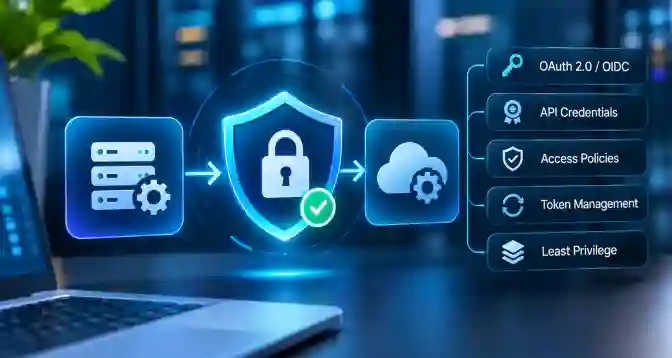

A company may know every employee who can enter its systems, but can it name every machine that has the same access? Behind every API call, automated task, and service connection is an identity that may hold the power to read data, change records, or trigger actions.
Unlike human users, these identities do not wait for someone to log in. They can keep operating through credentials and permissions long after their original purpose has changed. Machine to machine authentication gives applications, services, and APIs a way to prove who they are before exchanging data.
The real challenge is making sure that every machine can be identified, trusted, and restricted to the work it is meant to perform.
Why Machine Authentication Fails Quietly
Machine connections often run in the background. Machine to machine auth helps these connections work, but they may run for months without anyone checking their access. During this time, a service may keep using an old key, a shared account, or a token with more access than it needs.
These problems can stay hidden until someone misuses the access or a security review finds them.
Long-Lived Secrets Create Hidden Risk
- Old API Keys: Some apps use the same API key for years. Teams may avoid changing it because it could stop a live service from working. But if someone steals that key, they may keep using it until the team finds and blocks it.
- Secrets in Code: Developers may put passwords, API keys, or tokens inside scripts and code files. These secrets can leak through code repositories, shared files, logs, or development tools.
- Weak Rotation: Teams may not know which services use a key or where it is stored. They may delay changing it because they fear breaking an important connection. This leaves the same secret active for too long.
M2M authentication
Teams should store machine credentials in a secure secrets manager. Only approved people and services should be able to read them. They should also know which services use each secret and change old credentials before they become a risk.
This is also important in AI workspaces. Tools and agents may need access to several services, so teams must protect the credentials they use. Following credential management best practices for AI workspaces can help teams store, manage, and protect these credentials.
Shared Identities Make Activity Hard to Trace
- Shared Accounts: When many apps use one machine account, teams cannot easily tell which app made a request. Give each service its own identity so teams can track its activity and block it without affecting other services.
- Unknown Owners: Some service accounts stay active after a project ends or the person who created them leaves. Without a clear owner, teams may not know why an account still has access.
- Extra Permissions: A machine may keep access to data or systems it no longer needs. If someone takes control of that identity, those extra permissions may help them reach other systems.
M2M Auth
Enterprises often have service accounts, API clients, bots, and workloads. Each one may need different access. Teams should know which identity belongs to each service and who is responsible for it.
It also helps to understand the different types of non-human identities used across business systems. This makes it easier to find accounts that need an owner or better access controls.
When to Review Your Machine to Machine Authentication
Machine access should change when your systems change. A new API, cloud service, AI agent, or software update can create a new connection.
Teams should review these connections often, not only after a security problem. Regular checks help find old accounts, unused credentials, and permissions that no longer match the work.
Your Systems Have Grown or Changed
- New Services: Review access when you add an app, API, database, cloud workload, or outside service. Each connection needs its own identity, a clear owner, and access rules that match its purpose.
- New AI Agents: AI agents may use tools, APIs, and business apps without a person guiding every step. Give each agent its own identity. Allow it to use only the tools and data needed for its task.
- Old Workloads: Check services that have moved, changed owners, or stopped running. Remove identities and keys that are no longer needed. Old access should not stay active without a reason.
As your environment grows, it becomes harder to track every machine by hand. Keep an updated list of apps, service accounts, agents, and workloads. Record who owns each identity, what it connects to, and when someone last reviewed it.
OAuth machine to machine
When adding a new service, teams should decide how it will prove its identity and which systems it needs to reach. OAuth can manage access between services without requiring a person to sign in for every request.
Your Tokens or Access Rules No Longer Fit
- Long Token Life: Check how long access tokens stay valid. If someone steals a token, a long expiry gives them more time to use it. Set token life based on the task and its risk.
- Wide Access: Review token scopes and permissions. A service that only reads data should not have permission to change or delete it.
- Weak Trust Rules: Check how each machine proves its identity and how the receiving service checks that proof. Replace weak or shared secrets with stronger methods where your systems support them.
A good approach is to avoid giving machines permanent privileged access when they only need it for specific tasks. This is the idea behind Zero Standing Privileges (ZSP). Machine identities should not have permanent privileged permissions.
Just-in-Time (JIT) access supports this approach by giving the required permissions only when needed. These permissions are removed when the approved access period ends.
This approach is useful when teams want to limit permanent access. You can learn more about the Zero Standing Privileges model and how temporary access works.
What to Ask Before You Choose an Approach
There is no single method for every machine connection. A small internal script may need a different setup from a payment service or a cloud workload.
The right choice depends on the data, the risk, the number of connections, and the systems you already use. Before choosing a method, check how it proves machine identity and controls access.
Does the Method Give Every Machine a Strong Identity?
- Unique Identity: Check if every app, service, and workload can use its own identity. Avoid shared accounts because they make actions harder to trace. They can also force teams to change several services when one credential is exposed.
- Strong Proof: Check if the system supports secure client authentication methods such as mutual TLS (mTLS) or OAuth private key JWT authentication (private_key_jwt). With private key JWT authentication, the client signs an assertion using its private key. The authorization server checks this signature before accepting the client. These methods can provide stronger client authentication than using only shared secrets.
- Workload Support: Make sure the method works with your containers, cloud services, APIs, and automated jobs. It should fit the way your systems run and protect connections across different environments.
machine to machine auth
The method you choose should match what the service does and what it needs to access. For example, a service may use a client certificate, a private key, or a securely stored client secret to prove its identity.
Choose a method that fits the value of the data and the risk of the connection. Also check whether the same method works across your cloud services, containers, and other systems.
Can You Control Tokens, Permissions, and Activity?
- Short Token Life: Ask how the system sets token expiry and renews access. Tokens should last only as long as the task needs, where the system allows it. Renewal should follow clear security rules.
- Limited Access: Check whether you can set scopes, audiences, and resource limits. A token should work only with the service and actions it needs. It should not give wide access across the enterprise.
- Clear Records: Ask whether the system records token use, failed authentication checks, key changes, and access requests. Also, check whether these records show client or workload identity details. This helps teams identify which machine made each request and investigate unusual activity.
M2M OAuth
The OAuth 2.0 Client Credentials flow is a common choice for service-to-service access. The client proves its identity to an authorization server and receives an access token. The resource server checks that token before allowing the request.
Teams can check the OAuth 2.0 Client Credentials specification to understand how this flow works. They should also review current OAuth security guidance before setting up the connection.
Know Every Machine That Talks to Your Systems
You cannot secure machine access if you do not know which machines are using it. Start with a full list of service accounts, apps, APIs, cloud workloads, scripts, bots, and AI agents.
Connect each identity to an owner, a purpose, and the systems it can reach. This gives security teams a better view of where machine access exists and where controls may be missing.
Build a Clear List of Machine Identities
- Find Every Connection: Look across cloud platforms, databases, APIs, code tools, and business apps. Include old service accounts and machine identities that may not have a clear owner. These connections may keep working even after a project ends.
- Name an Owner: Record which team owns each identity and why it exists. The owner should know what the machine does, which systems it uses, and who can approve changes to its access.
- Track Its Access: Record the systems, data, permissions, keys, and tokens linked to each identity. Review this information when a service changes so the machine does not keep access it no longer needs.
What is machine to machine authentication
It is the process that lets apps, services, APIs, and devices prove their identities before they connect. An identity list helps teams see which systems are connecting, who owns them, and what they can access.
The list should include each machine's owner, purpose, credentials, permissions, and last review date. This makes it easier to find unused accounts and check unusual activity.
Set Rules for Every Machine Connection
- Use Least Access: Give each machine only the permissions it needs to complete its task. Keep read, write, and admin rights separate so one service does not get more power than its role requires.
- Watch Every Request: Track token use, failed authentication checks, unusual activity, and changes to machine credentials. Set alerts when a service tries to reach a system it does not normally use.
- Remove Old Access: Turn off identities, keys, and permissions when a service is retired or no longer needs access. Review active access on a regular schedule and check that each machine still has a business purpose.
AI agents add another part to this work. They may connect to several tools and services while completing a task. Each agent needs its own identity, limited permissions, and a record of its actions.
When reviewing AI agent identity platforms, teams should check how each option handles agent identities, permissions, and activity records. The right choice depends on the tools and systems the agents need to access.
Where Infisign UniFed Fits
Infisign UniFed focuses on customer identity and access management. It is not a dedicated machine-to-machine authentication or workload identity platform. It can support the customer-facing side of an enterprise identity plan through:
- Secure Customer Login: Supports single sign-on, social login, email OTP, and passwordless options for customer access. These features help customers sign in to connected applications without making machine credentials part of the user login process.
- Access Controls: Offers MFA and attribute-based access control to help apply rules to customer accounts. These controls help businesses decide how users sign in and what they can access.
- App Integration: Provides APIs and SDKs that help teams add identity and access features to their applications. This supports customer-facing login and access flows while machine identities are managed through the right M2M security controls.
For customer-facing applications, customer identity and access management covers a different need from machine identity management. Keep these two areas separate when planning access for users, services, and workloads.
If you are reviewing customer login and access, discuss your requirements with the team and see whether UniFed fits your setup and current systems by booking a demo when ready.
FAQ
1. What is machine to machine authentication?
It is the process that lets apps, services, APIs, and devices prove their identities before they connect. It helps stop unknown systems from using protected resources.
2. What is the difference between M2M authentication and authorization?
M2M authentication checks which machine is making a request. Authorization checks what that machine can do after its identity is verified. Both controls help protect systems and data.
3. How does OAuth machine to machine authentication work?
A client proves its identity to an authorization server. The server issues an access token, which the client sends to a protected API. The API checks the token before allowing access.
4. What are M2M tokens and how long should they last?
M2M tokens are digital access passes used by machines to reach protected services. Their life should be as short as practical, based on the task, risk, and system needs. Teams should also protect tokens and make sure they do not appear in logs or code.
5. What are the best practices for machine to machine authentication?
Use unique machine identities, strong client authentication, short-lived tokens, limited permissions, secure secret storage, regular key rotation, and clear activity logs. Review access often and remove unused identities, keys, and permissions.


