


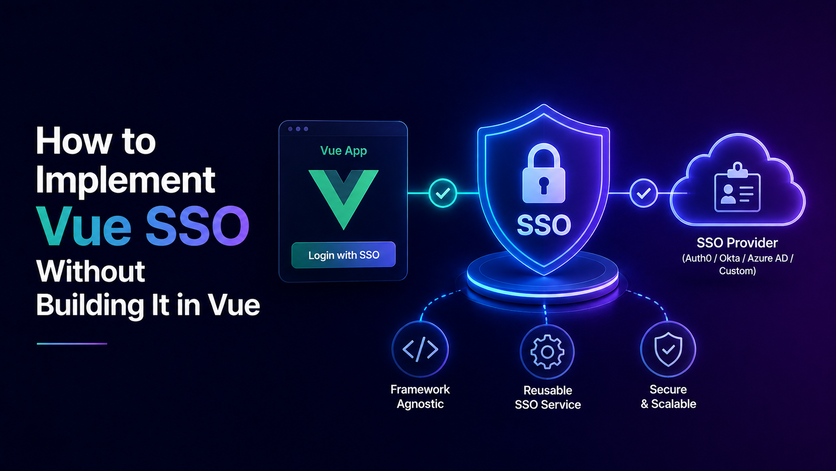

Managing Vue SSO means avoiding the trap of putting heavy security checks or sensitive tokens directly inside browser code. When enterprise clients demand corporate logins, frontend router guards and client-side storage open your app up to security vulnerabilities and break whenever a vendor changes their settings.
Real protection belongs on the backend server, where protocols and tokens stay isolated. Smart engineering teams rely on unified federation platforms to handle corporate directories and domain routing behind the scenes, keeping the user interface clean and ready for rapid scale.
If your frontend group ever feels bogged down by endless protocol updates instead of crafting smooth user experiences, taking a closer look at this architectural shift changes everything about how you build scalable software.
Why the Vue Part of SSO Is the Smallest Part
Developers building company logins for a Vue login often waste days worrying about router guards and component states. They assume authentication belongs in the browser because the login screen renders there. SSO is basically a login flow that passes info back and forth between the browser, frontend, backend, and identity provider, depending on how your system is set up.
Keeping Security Out of the Frontend
Setting up login right inside a Vue app means you have to pay close attention to security rules for OAuth or OIDC and keep track of how tokens are stored and refreshed.
Browsers cannot safely store secret keys, so you should always keep sensitive credentials and backend secrets on a trusted server instead. True enterprise security belongs on backend servers where tokens stay safe from prying eyes.
- Untrusted Browsers. Client side environments are never safe places to run heavy security checks or store sensitive tokens. Keeping keys off the browser stops attackers from inspecting your app code.
- Clean Separation. Your frontend code should stay completely away from raw protocol parsing and XML checks. Decoupling the user interface keeps your Vue OAuth2 project clean and easy to maintain over time.
- Simple UI Duties. The app only needs to catch the user email and wait for the final session pass to arrive. Letting the server do the heavy lifting keeps your entire system rock solid.
Surviving Corporate Vendor Switches
Big enterprise buyers change their tech providers all the time without giving much warning. If your login logic lived inside your Vue router authentication app every vendor change would force endless frontend updates. Keeping authentication on the server means vendor switches require zero changes to your Vue codebase.
- Vendor Independence. Server side identity layers absorb vendor changes instantly without touching your user interface code. Your app adapts to new tools behind the scenes without breaking a sweat.
- Zero Frontend Updates. Corporate clients can switch their login providers whenever they want without breaking your nuxt SSO app. This saves your team from rushing emergency patch releases.
- Saving Developer Time. Your front-end engineers skip endless protocol maintenance and focus entirely on building a great user experience. Keeping codebases separated protects your team from burnout.
What Most Vue SSO Tutorials Still Get Wrong
Most online guides for adding single sign on to VueJS authentication apps focus entirely on the wrong details. They teach developers how to install basic packages and store user tokens in browser storage. Following these simple tutorials leaves production software wide open to dangerous security exploits.
Treating Enterprise Auth Like a Consumer Widget
Standard tutorials treat corporate logins like basic consumer apps by ignoring core security rules. They skip crucial topics like token rotation and secure cookie handling entirely. Building software based on these weak guides leads straight to session hijacking and severe data leaks.
- Bad Token Storage. Storing sensitive credentials in browser storage lets malicious scripts steal tokens easily. For server-managed sessions, using secure, HttpOnly cookies with proper SameSite and CSRF defenses is a standard and recommended practice.
- Missing Security Checks. Consumer guides ignore advanced threats like algorithm confusion and session tampering. Real production apps need strict validation on every single backend request.
- Fragile Client Code. Relying on simplistic demos creates messy code that falls apart during strict corporate security audits in a nuxt auth project.
Ignoring Domain Routing and Session Management
Real enterprise software never uses clumsy dropdown menus for choosing a login provider. Buyers expect workers to type their email and get routed automatically based on their company domain in a Vue login page. Most online guides also fail to explain how to handle expired tokens without breaking the user workflow.
- Hardcoded Limitations. Basic guides rely on fixed provider lists that fail as soon as your client base grows. True enterprise architecture requires dynamic backend domain mapping.
- Token Expiration Traps. Tutorials rarely show how to refresh sessions quietly in the background overnight. Handling expiration poorly leads to random app crashes and frustrated users.
- Workflow Interruptions. Poor session management forces workers to log back in constantly while trying to finish tasks. Clean background refreshes keep enterprise users happy and productive.
The Vue SSO Decisions That Cost You Later and How to Handle Each One
Early choices in frontend login architecture decide how much pain your team faces later. Putting tokens in browser storage or trusting client side route guards creates massive security gaps in a Vue OAuth setup. Making the right architectural choices upfront prevents messy refactoring and keeps your app safe.
Choosing Where to Store Session Tokens
Many developers drop tokens into browser storage for convenience while ignoring major security risks in a nuxt authentication framework. Any malicious script injected through a third party package can read those credentials instantly. Setting cookies with HttpOnly and Secure flags stops scripts from stealing your session data, but your app still needs extra defenses against threats like XSS and CSRF.
- Browser Storage Dangers. Tokens saved in local storage can be read by any script running on the same site, so an XSS bug leaves those tokens wide open for an attacker to steal. Moving tokens to backend cookies keeps sensitive data completely out of reach.
- Backend Control. Managing credentials through secure server routines ensures client side scripts cannot touch them. This simple change stops major security exploits before they start.
- Long Term Safety. Setting up proper cookie rules early protects your app as your enterprise customer base grows. You avoid costly emergency fixes down the road.
Protecting Routes and Syncing Multiple Tabs
Client-side router guards make navigation smoother and improve the user experience, but you should never rely on them instead of proper server-side authentication and authorization checks. If a guard only checks memory without server validation a savvy user can easily bypass the UI. Managing state across multiple tabs also requires proper event handling to prevent lingering sessions.
- Beyond UI Guards. Client side checks only provide basic user experience feedback rather true security. Every request must still face strict server side token validation.
- Multi Tab Syncing. Logging out in one tab should instantly update all other open browser windows. Proper state management prevents users from seeing outdated authentication states.
- Seamless User Experience. Handling session termination events gracefully ensures your app stays secure and smooth. Enterprise users expect polished behavior across every browser window.
The Real Cost of Building Vue SSO In House
Building a custom corporate login system inside your IAM implementation always looks cheaper on paper than buying a ready made tool. Engineering managers often think it takes just a few weeks of coding UI forms. But the true cost shows up over years of endless maintenance, bug fixes, and security updates.
The Hidden Price of Developer Maintenance
Writing your own login code steals valuable time away from building features that actually make money. Every time a corporate client brings a weird setup your developers must drop everything to fix it. Wrestling with custom XML rules and expired certificates turns into a full time distraction.
- Stolen Engineering Time. Fixing custom login bugs burns hundreds of developer hours every single year. Your team gets stuck maintaining old code instead of shipping revenue driving updates.
- Constant Protocol Wrestling. Dealing with non standard identity provider quirks breaks your workflow repeatedly. Developers waste days debugging signature failures and parsing errors.
- Missed Product Goals. Spending weeks on authentication infrastructure stops your company from improving core software features. Your roadmap stalls out while competitors race ahead.
Security Risks and Failed Audits
Hand made login systems carry massive security risks that can devastate your business if something goes wrong. Enterprise buyers demand strict penetration tests and regular compliance reports before signing contracts. If your custom code fails an audit during a major sales cycle your deals stall out instantly.
- Dangerous Security Gaps. Improper cryptographic validation or weak session management invites severe data breaches. A single security flaw destroys customer trust overnight.
- Failed Enterprise Audits. Custom setups rarely pass tough corporate procurement checks on the first try. Losing deals over security red flags hurts your bottom line badly.
- Smart Infrastructure Choice. Investing in proven identity tools removes operational risk entirely and gives your sales team instant credibility. Your engineers stay fully focused on growing the main product safely.
The Questions to Ask Before You Pick an Identity Layer for Vue
Before adding any login tool to your Vue app your tech leaders need to ask tough questions about security and setup. Choosing the wrong infrastructure can trap your team in messy code and slow down your sales. Asking the right questions early saves your business from expensive mistakes.
Checking Protocol Handling and User Provisioning
Your chosen identity partner must turn messy legacy formats into clean data that your app can read easily. You also need to know if corporate clients can sync their employee lists automatically without bugging your support team.
- Protocol Abstraction. The service must convert complex protocols into a uniform format so your team never writes custom parsers. Clean data keeps your backend stable and predictable.
- Automated Provisioning. Systems should let corporate IT departments add or remove staff automatically through standard tools. This automation keeps user directories in sync without manual work.
- Proven Reliability. Review their uptime history, security certifications, and developer guides before making any final commitments. A dependable partner keeps your platform running smoothly around the clock.
Evaluating Frontend Integration and UI Control
Your developers must check how well the identity layer fits into existing state management tools inside Vue. Rigid login components that clash with your brand guidelines will force your team to waste weeks fighting the UI. Look for flexible tools that give your designers total control over the interface.
- Design Freedom. The platform should offer flexible SDKs that let your team build custom login screens. Keeping your brand look intact matters for user trust.
- Session Compatibility. The identity layer must connect smoothly with your current user session model without major rewrites. Clean integration protects your core product code from breaking.
- Long Term Scaling. Evaluating these boundaries early ensures your tech stack handles hundreds of corporate configurations without slowing down.
What Vue SSO Looks Like When the Identity Layer Does the Work
When you separate authentication from your frontend app and use a dedicated identity platform, your work in Vue changes completely. Instead of managing complex security files and custom SDKs your Vue app interacts with a clean and simple API. When a user clicks login your frontend just calls a standard endpoint and lets the backend handle the rest.
Simplifying Frontend Code
Letting an outside identity layer do the heavy lifting keeps your Vue project clean and easy to maintain. Your components simply receive a clean user object with standard details so your app can render views instantly. All the messy work of talking to different enterprise providers happens safely away from your browser code.
- Clean API Calls. If you use a backend or BFF setup, your Vue frontend only talks to your own app endpoints, while the backend handles all the provider specific protocols in the background. Keeping requests simple stops bugs from sneaking into your user interface.
- Ready to Use User Data. Your components can receive clean user and permission details directly from your backend or identity layer, with the specific claims and roles depending on your identity provider and how everything is set up.
- Zero Security Bloat. Keeping cryptographic tools off your frontend protects your app from accidental data leaks. Your developers never have to stress about browser side security flaws.
Handling Vendor Changes Instantly
When you hide your login setup behind a clean interface, you can switch identity providers later without having to change or redeploy your Vue app frontend. This smooth workflow lets your company add new enterprise clients in minutes without breaking a sweat.
- Central Dashboards. Managing provider tweaks and security keys happens entirely outside your app codebase. You update settings in one place and let the system handle the rest.
- No Code Deployments. Corporate clients can switch their login tools whenever they want without forcing your team to release new app versions. This saves your engineers from emergency weekend work.
- Faster Enterprise Growth. Onboarding new business clients instantly gives your sales team a massive edge in the market. Your tech stack scales up smoothly as your customer base expands.
Make the Vue SSO Decision Before Your Next Enterprise Deal Forces It
Waiting for a major corporate buyer to demand login support before planning your auth strategy invites total chaos. Rushing complex setups under tight deadlines creates fragile code and missed revenue targets. Planning your architecture early helps your company close large enterprise deals smoothly without last-minute panic. By integrating Infisign UniFed, you can centralize your login controls and make it easier to meet enterprise security and compliance rules.
- Maps enterprise domains and handles multiple identity protocols on the backend so your frontend code stays clean.
- Handles automated user provisioning and directory syncs out of the box, keeping corporate lists updated without manual engineering effort.
- It offers security controls and audit features that help meet enterprise security, compliance, and procurement requirements.
Stop letting last-minute auth demands stall your sales pipeline. Head over to the Infisign demo page and book a meeting today to see how a centralized identity and federation layer can simplify enterprise authentication and reduce identity-provider-specific complexity.
FAQ
Why keep authentication logic entirely on the backend server?
Keeping sensitive credentials and login logic on the server keeps them safe from browser code. When your sessions use properly set up HttpOnly cookies, scripts cannot read the session cookie directly, though you still need extra security measures to keep your app safe.
How does backend single sign on prevent costly vendor changes?
Server-side architecture isolates identity protocols away from your user interface code. When you hide your login setup behind a clean backend interface, you can switch identity providers later without having to change or redeploy your frontend.
Why do standard frontend authentication tutorials create security risks?
Some simplified guides store authentication tokens in browser storage without fully covering the security risks or server-side authorization. Since browser storage is wide open to any script running on the same origin, you should generally avoid keeping sensitive tokens there.
What is the real business cost of building authentication in house?
Writing custom login code burns hundreds of developer hours on protocol maintenance and XML debugging. This constant distraction pulls your engineering team away from shipping core product updates that drive revenue.
How does early identity planning help close enterprise deals faster?
Setting up a robust backend login foundation ahead of time lets your sales team immediately answer strict procurement security questions, turning compliance requirements into a major competitive advantage


