


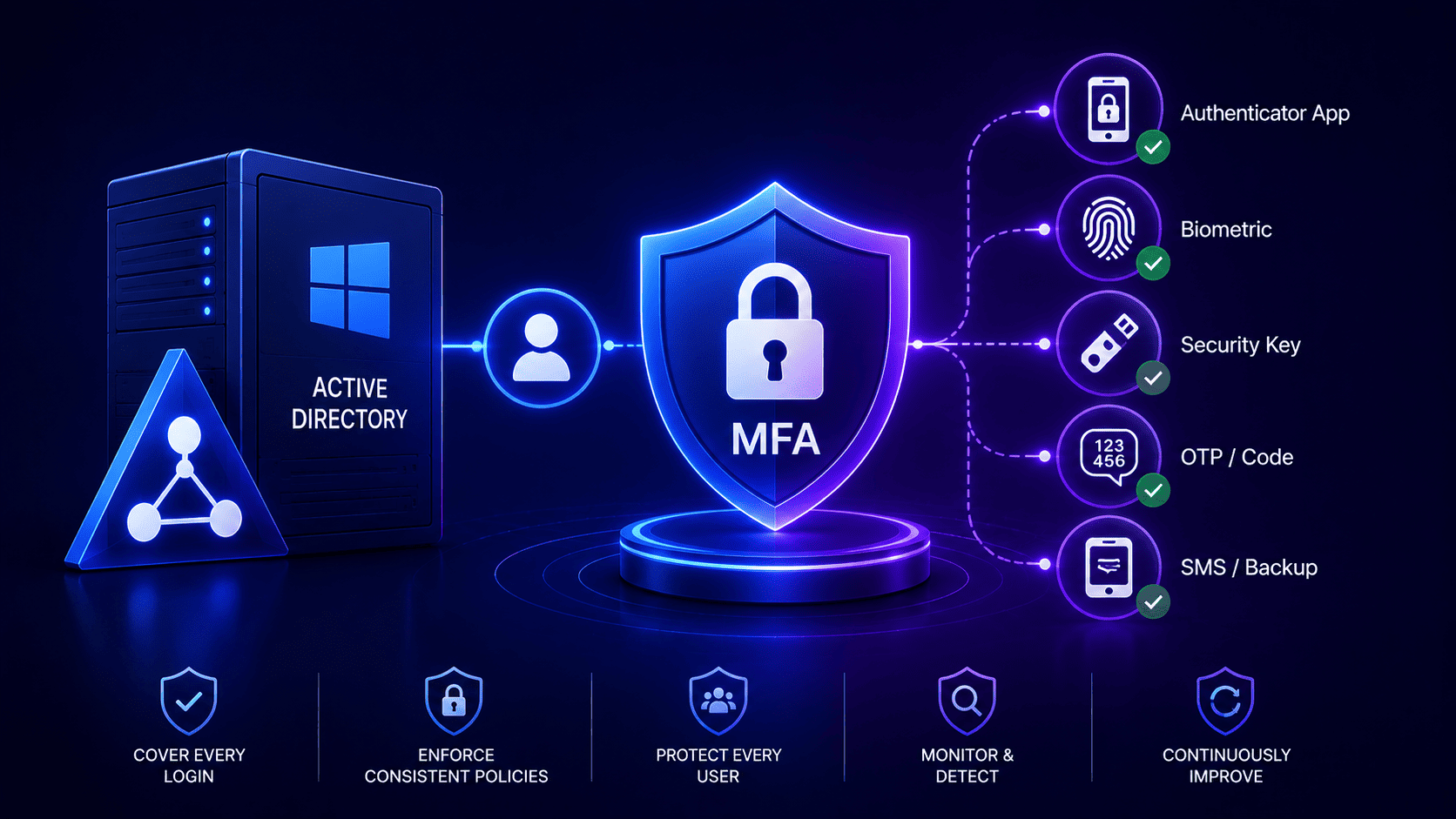

Active Directory Domain Services does not include a built-in multi-factor authentication policy that covers every Windows login and network check. Because of this gap, companies add outside tools or extra identity layers whenever they need stronger security.
Securing local environments requires figuring out how to implement MFA in active directory because legacy designs leave major security gaps.
Companies face severe compliance pressures and hybrid threats that make patching old systems risky and expensive. Moving toward a unified cloud platform eliminates fragile workarounds and sync delays.
Organizations must close these vulnerabilities before auditors or attackers find them.
Active Directory Was Never Built to Ask for a Second Factor
Active Directory belongs to an older era of computing when local networks felt safe and castle walls were enough. Back then nobody worried about phone prompts or hardware keys because the main goal was simply checking passwords as fast as possible. Because the core engine lacks any native way to pause a login request, modern security often starts by figuring out how to implement MFA in Azure instead of relying on old patches.
Old Rules And Missing Pieces
AD DS mostly handles standard Windows logins using Kerberos and NTLM, but it cannot add a second security check to every single sign in attempt on its own. Everything runs on quick static string lookups and ticket grants which leaves zero room in the middle for a mobile notification.
- Protocol Design. The core protocol uses basic checks like password hashes and hands over access immediately without stopping for any other verification step. There are no native features to pause the connection for an extra check.
- Missing Extensibility. AD DS lacks a built-in multi-factor tool for every login path, meaning companies rely on Windows credential providers, AD FS, Microsoft Entra ID, RADIUS setups, or outside software depending on what they need.
External Patches And Risky Workarounds
Trying to force modern security onto legacy software creates a lot of strain and introduces heavy technical risks. Organizations often need extra tools or login layers to add a second security step for sign in paths that AD DS leaves unprotected.
- External Interception. Security teams have to use third party tools or change registry settings to intercept traffic and hold requests until a second check clears. This creates friction and latency during the login flow.
- Operational Risks. These extra filters put the entire network at risk because a small mistake in the code can crash the main security service and lock everyone out. Domain controllers face serious stability threats from this added complexity.
Why This Landed on Your Desk This Quarter
Cyber insurance rules and stricter compliance laws have turned legacy security gaps into an emergency for leadership boards. Many cyber insurance forms and policies push for multi-factor security on high risk or remote access points, but every provider has its own rules.
Because threat groups easily slip through exposed local endpoints to move across the network. Boards are pushing this project onto your desk with tight deadlines.
The Insurance And Compliance Pressure
Insurance underwriters have stopped renewing policies for networks lacking broad secondary controls while demanding cryptographic proof and continuous logs through strict multi factor authentication. Failing these audits triggers massive premium spikes or total coverage denials due to strict negligence clauses in policy contracts.
- Underwriter Demands. Insurers reject vague security claims and want hard proof of multi factor coverage everywhere. Missing these rules means denied claims and heavy financial losses if something goes wrong.
- Strict Regulations. PCI DSS and HIPAA often call for stricter security and tighter access rules, but the exact demands depend on your system setup, who is logging in, and your specific compliance scope.
The Hybrid Threat Reality
Attackers routinely target hybrid setups where cloud apps are safe while local domain controllers remain exposed to brute force entry. Once an adversary slips through an old VPN or remote desktop endpoint they move laterally across the whole company.
- Exposed Endpoints. Hackers use stolen passwords to break into weak remote access points and grab a foothold. Leaving old domain controllers unprotected ruins the safety gains made in the cloud.
- Lateral Movement. Leaders finally see that half baked security leaves the whole business wide open to smart intruders. Board members now treat these weak spots as major threats that need instant fixes.
The Five Ways to Add MFA to Active Directory and What Each One Misses
Bringing extra security to a local domain always means picking from five imperfect models because every choice leaves certain blind spots open especially when teams look at implementing MFA on my network. Companies have to weigh what each method covers while keeping track of the hidden risks that come with them.
- Federation Services. Active Directory Federation Services can require a second security check for apps and services that use it for sign-ins, but it cannot automatically protect direct Windows desktop or server logins with that extra step. It is a common hurdle when planning an Azure MFA implementation.
- Network Policy Server Extensions. Microsoft Entra multi-factor security using the Network Policy Server extension can protect tools like VPN gateways, but it cannot secure regular Windows computer logins because those logins do not use that connection method.
- Credential Providers on Windows Workstations. Putting third party software right on the workstation login screen covers physical desks well but breaks down during major operating system updates, creates friction during standard windows authentication, and struggles when offline.
- Cloud Directory Synchronization. Syncing identities to the cloud lets you use smart access rules but creates a dangerous internet dependency and introduces frustrating delays when user details take too long to update, a factor often considered when trying to implement MFA office 365.
- Third-Party LDAP/Kerberos Proxies. Placing an inline proxy right in the middle of authentication traffic stops attackers but creates a massive single point of failure that can cause total network outages if it crashes.
The Coverage Gaps That Show Up After Go Live
Real life use always shows big problems that tests miss because background tools and offline laptops break strict rules. IT teams often have to make dangerous safety exceptions just to keep the office running while figuring out implementing MFA on my network.
Service Accounts And Legacy Breakage Background scripts and old apps crash when they get a sudden check prompt because they cannot tap a phone screen. Admins have to make big rule bypasses that hackers look for during attacks.
- Exclusion Management. IT teams make special lists to let background tools skip the checks and hackers scan for these exact accounts to break in.
- Legacy Application Breakage. Old software built with fixed passwords fails under strict rules which forces teams to pick between app crashes and weak security, especially when evaluating how to implement Duo MFA for alternative pathways.
Network Outages And Lateral Movement Losing internet access locks offline workers out of their PCs so admins turn on weak backup modes. At the same time internal server traffic often lacks security checks and lets hackers move freely from one computer to another.
- Offline Workstation Lockouts. Laptops cut off from the web leave traveling staff stuck unless offline saving is turned on which creates big security holes.
- Network Segmentation Failures. Hackers who break into one computer use open network tools to jump across other internal systems without ever seeing a second check prompt.
What Active Directory MFA Actually Costs Before You Sign Off
Buying and setting up security tools for a network costs a lot more than just paying for user licenses because figuring out how to implement MFA in office 365 brings hidden expenses that pile up fast. Companies have to spend money on extra servers, help desks and hardware while dealing with lost time from everyday work.
- Software Licensing. Buying user seats is just the first step because total bills grow fast when companies pay for extra enterprise tools and vendor help plans.
- Infrastructure Scaling. Teams must buy extra servers and network load helpers to handle busy login times so the system does not slow down for users.
- Hardware Expenses. Buying physical security keys and replacing lost tokens adds extra cash costs that bosses often forget to put in early budgets.
- Help Desk Support. People lose phones or break apps which causes a huge jump in support calls that takes up all the time of the IT help team.
- Engineering Hours. Smart tech workers spend many weeks testing updates and fixing broken domain servers instead of building cool new projects for the office.
The Questions to Ask Before You Approve Any MFA Rollout
Before you sign off on any security plan you need to ask hard questions about what happens when things break or the internet goes down. Vendors always show nice demo videos but you have to know how the system deals with real life stress and messy edge cases.
- Service Accounts. How does the tool run automated scripts and background tasks without leaving giant security holes open for hackers to use?
- Offline Workers. What happens to staff members stuck in places with zero web access when they need to log into their laptops?
- Coverage Scope. Does the software actually protect physical office PCs and remote desktop links or just modern web apps and VPN doors?
- Peak Traffic Latency. How much does login speed slow down when thousands of workers try to sign in at the exact same time every morning?
- Admin Recovery. What is the exact backup plan if the top system admin loses their phone and gets locked out of the whole network?
What Full Coverage Looks Like When Identity Runs on One Platform
Moving to one single cloud platform gets rid of messy patches and old proxy servers so every login follows the exact same strong rules through comprehensive identity and access management. Security teams gain full control over all access attempts whether workers use local office PCs or cloud apps.
Unified Identity Controls And Native Passkeys
Microsoft Entra Conditional Access can bring access rules for supported cloud resources into one place and check things like device health or location, but you still need traditional Active Directory and Group Policy settings to manage your on-premises Windows computers.
Modern hardware keys work smoothly right inside the operating system without needing extra agents or fragile workarounds.
- Global Policy Rules. Admins write one set of smart rules that look at sign in risks instantly and only add extra checks when something looks unusual.
- Hardware Passkeys. FIDO2 security keys offer strong protection against phishing attacks, while passkeys can stay locked to a single device or sync across others depending on your setup.
Total Elimination Of Legacy Gaps
Cloud native identity removes annoying sync delays so user account updates happen instantly across all connected systems without waiting. Azure workloads that support managed identities can do away with manual password handling for apps, while older and local service accounts need different security steps.
- Zero Sync Delays. Automated provisioning and synchronization speed up onboarding and offboarding, but updates do not always sync across every connected system instantly.
- Managed Identities. Old service accounts with static passwords go away completely and get replaced by automated credential rotations that stop attackers cold.
Close the Gaps Before an Auditor or an Attacker Finds Them
Leaving weak spots in your setup invites big hacks and failed audits that can cost a lot of money. Hackers spend all day looking for old entry points and forgotten service accounts that skip safety checks. You have to check every login path in your network and clean up bad rules right now. Fixing these gaps keeps your business safe and makes sure you pass strict legal tests without any trouble.
- Find Weak Spots. Scan your whole network to spot old entry points and service accounts that do not have proper safety checks.
- Stop One Time Fixes. Treat safety as an ongoing job instead of a quick project so your network stays strong over time.
- Keep Testing. Run regular security checks to make sure hackers cannot slip through hidden doors or unmonitored tools.
Legacy infrastructure leaves critical blind spots because older domain controllers were built solely for quick password checks without native support for pause prompts. Organizations facing strict compliance audits and rising cyber threats often struggle to patch these foundational vulnerabilities without breaking daily operations or relying on fragile external proxies.
Infisign UniFed resolves this architectural gap by unifying identity controls across hybrid environments, securing local access points naturally, and eliminating the risks tied to outdated security workarounds.
- Secures local Active Directory environments by routing authentication requests through a unified platform that eliminates the need for unstable external proxies or fragile registry hacks.
- Protects remote gateways and workstation login screens natively to prevent lateral movement and stop attackers from exploiting exposed endpoints during hybrid work scenarios.
- Supported workloads can cut down on static passwords using proper identity management and key rotation tools, but replacing traditional Active Directory service accounts depends on the specific workload.
Legacy domain vulnerabilities and compliance pressures demand immediate attention before an audit or breach forces your hand. Waiting to fix outdated security gaps leaves your entire network exposed to lateral movement and severe financial penalties.
Take control of your hybrid environment today and see how a unified identity approach protects every access point. Schedule a personalized walkthrough on the Infisign demo page to map out a clear path toward complete protection without breaking your current infrastructure.
FAQ
How do organizations protect legacy Active Directory without rewriting their entire core architecture?
Organizations can add a centralized identity or MFA layer for supported authentication flows, but protecting all local Active Directory access points requires an architecture that accounts for the specific Windows, Kerberos, NTLM, application, and remote-access authentication paths in use.
Can companies secure remote workers and workstations without disrupting daily workflows?
Yes, organizations can secure remote access and workstation logins using multi-factor or phishing-resistant authentication, provided the chosen platform supports those integrations and the setup is done correctly.
How do systems handle traditional service accounts and legacy applications that break under strict checks?
They replace static service account passwords with automated identity rotations and smart risk policies, closing compliance gaps without causing application crashes.
What role does adaptive multi-factor authentication play during routine network operations?
Adaptive MFA evaluates real-time login context such as location, device health, and risk levels, triggering extra verification only when suspicious patterns appear.
How does adopting a unified identity approach help companies handle strict compliance audits like HIPAA and PCI DSS?
Centralized policies, access reviews, and audit logs help companies gather proof for regulations, but having them in place does not automatically guarantee full compliance.


