


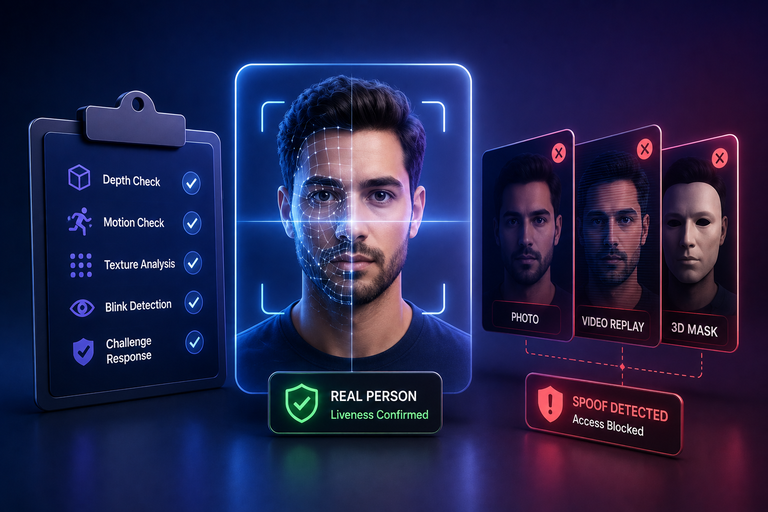

Identity checks often fail behind the scenes. A system might accept a fake face or block a real person while just logging a simple error code. Teams usually find out too late when fraud losses pile up or an outside auditor spots the hole. Testing liveness detection means ignoring flashy ads and checking how well the software actually tells a real human apart from a fake mask.
What Liveness Detection Actually Proves and What It Does Not
A liveness check analyzes biometric traits and responses to determine if a living subject is present at the capture point. This presentation attack detection system targets specific threats like printed photos, displayed screens, or masks based on how it is built and tested. It still does not prove account ownership, meaning real safety requires additional checks like face matching.
What Liveness Check Actually Does
This system checks if a live human is looking at the camera without any fake tricks. Using biometric liveness detection can help detect presentation attacks such as simple photos, ensuring a real user is present during onboarding. Modern security systems rely heavily on biometric authentication methods to ensure that a real user is present during onboarding.
- Physical Presence Check. The tool checks if a real user is present by asking them to blink or smile. This step can help detect static presentation attacks such as printed photos or paper cutouts to trick the camera lens.
- The Impostor Problem. The software cannot tell if the person in front of the lens is the actual account owner or a stranger. A prerecorded video may defeat a weak liveness implementation, particularly when the system relies on predictable movement cues.
- Only A Small Step. Liveness is just a tiny starting point rather than a complete security shield. In identity-verification applications, liveness is typically combined with biometric comparison and other identity-verification controls.
Why Relying Only On Liveness Is Dangerous
Depending solely on biological presence puts the entire user account at serious risk of getting hacked. Setting up active liveness detection makes users do random actions like turning their head.
- Missing The Identity. Many teams make the major mistake of treating liveness as total identity verification. The check only tells you that a living face triggered the sensor without confirming any records.
- Lifecycle Blindness. Security teams should consider how onboarding controls relate to ongoing authentication, session monitoring, and account-recovery controls to ensure the same user returns later.
- Context And Intent. Liveness detection does not by itself establish user intent or account ownership. It only processes basic physical movements without understanding the broader situation.
The Certification Your Vendor Shows You Does Not Cover the Attack You Are Losing To
Vendor certificates do not mean your system is safe from real hackers. Companies often show badges from testing labs proving they pass basic rules. These tests evaluate defined attack types under specified test conditions, so their results should be interpreted within the scope of the evaluation. But real attacks are much messier and harder to stop.
Why Vendor Badges Can Mislead You
Testing labs check systems using fixed fake items like printed pictures under bright lights. Using face liveness detection helps block these standard tricks in clean lab conditions.
- Controlled Lab Tests. Testing laboratories evaluate systems against defined presentation attack instruments and under specified test conditions, such as clean rooms with optimal lighting and high-quality cameras.
- Smart New Threats. Bad actors do not use boring old tricks from lab books anymore. They build custom neural network videos and clever masks that match specific skin tones. A vendor can easily pass a sterile lab audit while failing against new computer tricks.
- Overfitted Software Models. Companies often tune code to pass fixed tests, making the system good at old tricks while vulnerable to new threats. A test result should be interpreted within its stated scope rather than treated as proof of universal resistance against production attacks.
The Gap Between Standards And Reality
Standards define specific testing scopes and attack categories, so passing a standardized evaluation does not establish resistance to every attack scenario. Running proper passive liveness detection keeps the app safe without bothering the user.
- Slow Testing Frameworks. Official evaluations measure performance against defined attack types and test conditions, so their results should be considered within that scope. Generative computer tech moves faster than updating standard safety rules.
- Bypassing Mobile Apps. Attackers can attempt digital injection attacks by introducing forged or modified biometric media into the software pipeline between capture and biometric processing.
- Demanding Real Proof. Engineering teams must stop trusting static audit papers blindly. You need live red team tests and proof against custom synthetic media.
Where Liveness Detection Breaks in Real Deployments
Real production environments bring many messy variables that clean lab tests can never copy. Users try to log in under bad lighting or with cheap phone cameras. Poor camera quality makes it hard for algorithms to catch fine details.
Why Real Environments Break Security
Poor lighting and dirty camera lenses make it very hard for apps to scan faces correctly. Adding deepfake detection helps stop advanced synthetic video tricks in production.
- Messy Real World Lighting. People try to authenticate in dark rooms or under bright sunlight that ruins the image. Older phone models use cheap camera sensors and blurry lenses that hide important skin textures.
- The Software Pipeline Flaw. Digital injection attacks can create a security gap when forged biometric media is introduced into the software processing path. Attackers can attempt to bypass the normal capture path by introducing forged biometric media into the application's processing pipeline, allowing them to attempt to inject forged or prerecorded biometric media into the application's biometric processing path.
- Trusting Broken Input Data. Mobile apps often trust incoming data streams without checking if the device environment is safe. Even the strongest facial algorithm becomes useless if the data path is manipulated.
Camera Injection And Scaled Fraud
Hackers now bypass the physical camera sensor entirely using automated software manipulation and bot farms. Using liveness detection technology correctly means securing the entire journey of the data stream.
- Bypassing The Physical Sensor. Modern fraud relies on software tricks instead of holding up physical masks. Fraudsters can use both physical presentation attacks and digital injection techniques, depending on the target system, running modified apps on automated bot farms to scale their attacks.
- Massive Fake Account Creation. Letting systems rely only on server checks without hardware validation leads to huge problems. Bad actors can create thousands of fake accounts quickly if the device is not checked.
- Securing The Complete Path. Companies cannot rely on basic checks to stop automated fraud campaigns at scale. You need to secure the entire path from the physical glass lens to the backend database.
Your Help Desk Is Now the Cheapest Way Into Your Enterprise
Support teams are now the easiest targets for hackers trying to break into company systems. When automated defenses get too tough, criminals trick human support agents instead, as help-desk and account-recovery workflows can become attractive targets for social-engineering attacks where callers pretend to be locked out users with fake IDs.
- The Weakest Human Link. Attackers trick agents by claiming they lost their phone during a stressful call. Since agents want to solve tickets fast, they skip safety checks and hand over access. While deepfake detection may provide an additional signal for identifying synthetic media, it should not be treated as a standalone control against social engineering.
- Bypassing Digital Defenses. Basic security checks placed only at registration cannot stop social engineering attacks during account recovery. Leaving help desk overrides outside core safety setups wastes all software protection investments with just one simple phone call.
- Exploiting Empathy And Pressure. Hackers use stolen personal data and rehearse company words to manipulate the natural helpfulness of staff. Companies must apply strict security rules to manual support overrides just like automated setups.
The Questions to Ask Before You Sign a Liveness Detection Vendor
As companies move toward passwordless authentication, verifying who is behind the screen becomes the most critical layer of defense against fraud. Evaluating a liveness vendor requires cutting through marketing noise and demanding specific, verifiable technical details. Security and engineering teams should ask the following questions during the vendor selection process:
- How does your SDK prevent video injection attacks and the use of virtual cameras at the application layer?
- Look for end-to-end cryptographic signing of image payloads, runtime application self-protection, and hardware-backed attestation integration.
- Can you provide vulnerability reports and test results specifically for synthetic media and generative AI deepfakes?
- Ensure testing covers recent generation adversarial attacks rather than just traditional silicone masks and paper cutouts.
- What is your fallback mechanism when ambient lighting or device camera quality is poor?
- Understand whether the system lowers security parameters or rejects the user, and how those thresholds are configured.
- Where does biometric processing occur, and how is raw data handled for privacy compliance?
- Verify whether processing happens on the device edge or on remote servers, and confirm adherence to privacy regulations like GDPR and BIPA.
- What specific metrics do you provide regarding False Acceptance Rates during real-world operational traffic?
- Request data from live deployments rather than just isolated laboratory benchmarks.
Pushing vendors beyond standard sales pitches exposes the architectural limitations of their software. Many providers claim deepfake defense, but their models collapse when confronted with real-world compression artifacts or customized neural rendering. Vendor claims about deepfake resistance should be evaluated against documented attack types, test conditions, and independent testing.
Requiring proof of client-side integrity checks and real-world performance metrics forces vendors to reveal whether their technology is built for modern threat landscapes or merely designed to pass legacy compliance checklists.
What Liveness Detection Looks Like When It Sits Inside Identity
Mature identity architectures can connect biometric verification with device, behavioral, and contextual signals to apply risk-based controls, ensuring that every single login and risky action flows through a central engine.
- A Continuous Safety Signal. When face verification lives inside the core system, it stops being a one-time wall and turns into an ongoing check. A normal login from a known phone only needs a quick passive scan. But a sudden big money transfer from a strange location triggers strict extra steps like passive liveness detection to block fraud.
- Stopping Weak Integration Points. Moving face checks into a unified control layer removes the gaps that hackers look for. Instead of treating login as a random event, the system judges every digital tap through a central risk hub.
- Dynamic Protection Scaling. Smart platforms adjust their security levels based on how risky an action looks. Good users enjoy a smooth login experience without annoying blocks.
Decide Where Liveness Detection Sits Before an Attacker Does
Letting different company teams buy and use separate face tools creates big safety holes. One team uses software for sign ups while support uses another for account resets. Hackers look for the gaps between these broken tools to slip inside.
- Centralizing Your Security Strategy. Bosses must take total charge of identity tools and push every check into one main place. Setting clear rules for checks and backups gets rid of weak spots everywhere. Centralizing face-verification policies can help organizations apply more consistent controls across access workflows.
- Building Cross-Functional Alignment. Tech and safety teams must join forces under one shared plan to guard all doors equally. If you fail to bring your defenses together your firm will always chase smart thieves who hunt for your weakest spot.
- Closing Every Attack Gap. A single joined setup leaves zero hidden corners for bad bots or clever tricksters to abuse. When every single touch point uses the exact same hard rules outsiders lose their favorite paths to break your network.
Infisign positions UniFed as a unified identity platform that brings multiple identity and access capabilities together, handling identity checks, device trust, and access rules in a single place instead of letting different teams use separate tools.
- Infisign positions UniFed as a way to centralize identity and access controls and reduce fragmentation across security workflows.
- Infisign describes its identity-security capabilities as supporting adaptive security based on contextual and behavioral signals, adjusting safety levels dynamically based on user behavior, device reputation, and network telemetry.
- Infisign positions UniFed as a unified identity layer that can support identity and access workflows across multiple stages of the user lifecycle. It is designed to help organizations address automated fraud and digital bypass risks as part of a broader identity-security strategy, keeping companies fully protected against modern spoofing threats.
Looking to stop chasing sophisticated attackers and secure the vulnerabilities in your defenses?
Eliminate the risks of fragmented verification tools leaving your enterprise exposed to fraud.
Visit the Infisign demo page today and schedule a brief consultation with our team to discover how easily you can protect your entire system.
FAQ
What is the main limitation of traditional liveness detection?
Liveness detection helps determine whether a biometric sample is being presented by a living subject, but it does not by itself establish account ownership. Traditional verification only proves a physical face is present at that exact moment without confirming if that person is the rightful account owner or an impostor using a stolen high-resolution video stream.
Why do standard vendor laboratory certifications often fail in real production environments?
Laboratory PAD tests evaluate defined attack types under specified test conditions. Real-world deployments can introduce different lighting, device, image-quality, and attack conditions from those used in a particular laboratory evaluation, allowing modern generative threats to bypass sterile compliance checks.
How do hackers bypass mobile app camera sensors during authentication?
Attackers can attempt digital injection attacks by introducing forged or modified biometric media into the application's processing path, completely skipping the physical camera lens by using virtual tools and proxy software to feed fake video straight into the app.
Why is relying solely on onboarding liveness a major enterprise risk?
Onboarding liveness alone does not protect against social engineering or human manipulation during later account-recovery workflows, leaving accounts vulnerable when attackers trick support agents into manual overrides that bypass digital security controls completely.
How does Infisign UniFed protect enterprises from fragmented verification tools?
Infisign describes UniFed as a unified identity platform for bringing identity and access controls together across workflows, centralizing identity checks, device trust, and access rules into one dashboard to secure every touchpoint from onboarding to support workflows while blocking automated bot farms and digital bypasses.


