


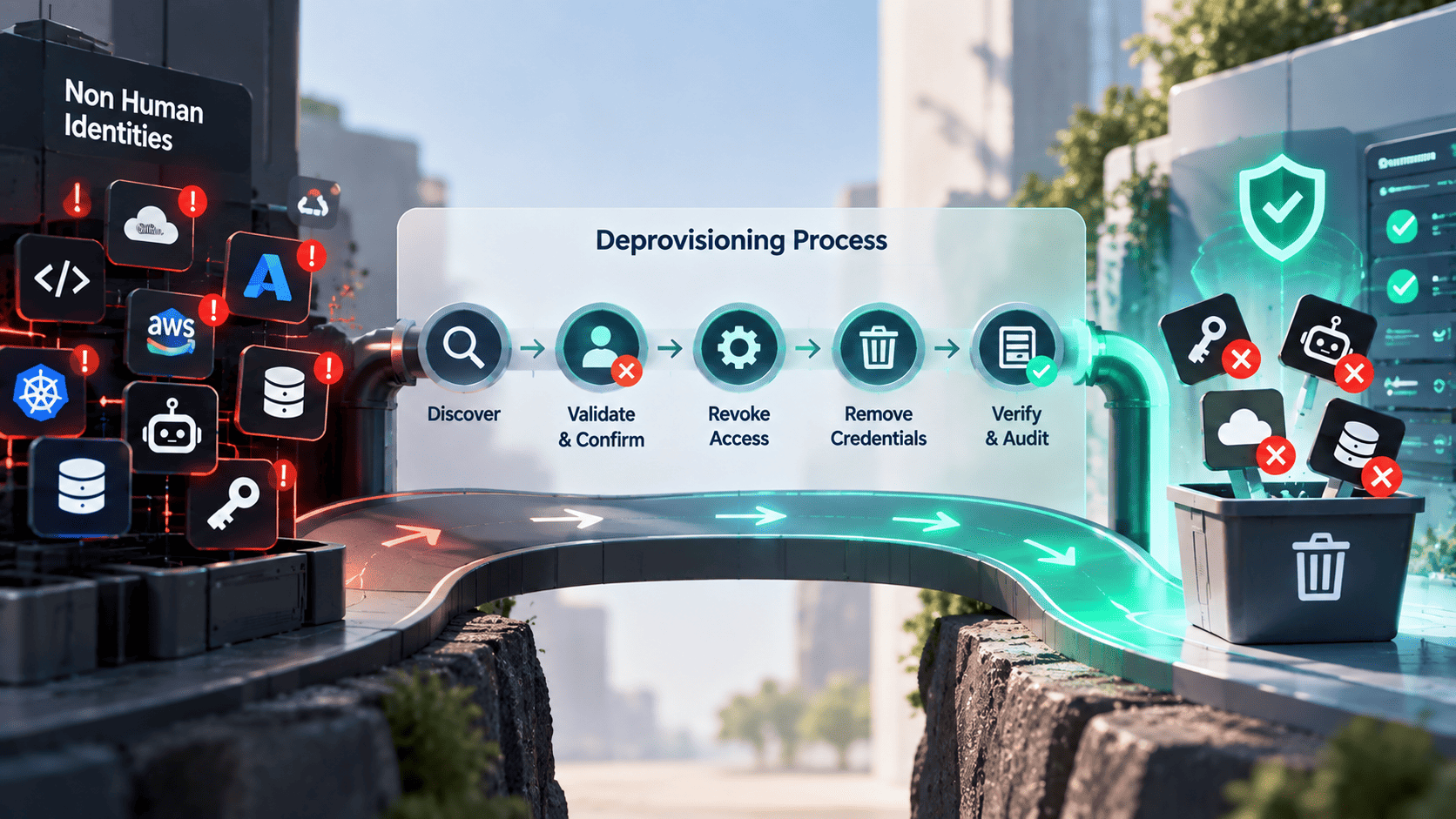

Software tools and cloud applications talk to each other automatically using non-human accounts. When projects finish or internal systems get updated, these automated accounts often stay active without anyone noticing.
Leaving unused credentials open exposes company databases to major safety risks. Non-human identity deprovisioning is the process of disabling or removing a non-human identity and revoking its credentials, permissions, and access when it is no longer required.
This process shuts down abandoned entry points, protects internal systems from unexpected entry, and keeps your software network safe and clean.
What Is Non Human Identity Deprovisioning?
Software tools and cloud services talk to each other using non-human identities without any human help. These automated setups need regular maintenance to keep company networks safe. While a standard employee offboarding checklist covers human staff, removing machine access rights when a project finishes or a script stops running is just as essential. Non human identity deprovisioning is the complete cleanup process that wipes out these old accounts and credentials.
- Complete Access Cleanup. This step wipes out old API keys, OAuth tokens, and system permissions. It stops unused software from holding access to sensitive databases, which directly helps prevent secrets sprawl across your infrastructure. This makes sure no old backdoors stay open after a project ends.
- Directory Removal. The system deletes the account record from central directory services. This step removes the identity object completely rather than just turning it off. It ensures the system treats the account as fully gone.
- System Disconnection. Automated scripts and background tools lose their connection to active networks. This stops background processes from running without supervision. It keeps your network clean and organized.
Why NHI Deprovisioning Matters
Unmonitored software access creates big safety risks for company networks. Human workers log off at the end of their shift, but non-human accounts stay active day and night. While standard user offboarding handles human team members when they leave, old non-human accounts often get forgotten.
If an old application keeps its permissions after a project finishes, outsiders can find those keys and get inside. Proper cleanup keeps network entry points closed and protects internal records.
- Closing Access Paths. Removing old credentials stops unauthorized users from finding forgotten entry points. Regular api key rotation and total deletion of unused keys ensure attackers cannot exploit active accounts that nobody monitors anymore. Deleting these keys keeps company servers safe from unseen entries.
- Lowering Network Risk. Fewer active accounts mean fewer places where security problems can happen. Cleaning up old access cuts down the overall attack surface. This simple habit keeps internal tools safe from unexpected entry.
- Meeting Compliance Standards. Regulators require companies to show tight control over stored data. Deleting unused software accounts proves that only active systems can reach sensitive info. This helps companies pass security reviews without extra trouble.
Which Non Human Identities Need Deprovisioning?
Every automated tool that connects to your network needs tracking and proper removal. Applications use various kinds of credentials to talk with databases and cloud services. Leaving any of these keys behind after a task ends creates an unmonitored entry point. Knowing which types of access exist helps teams clean up everything completely.
- Cloud Service Accounts. These identities let background software run tasks inside cloud platforms. Maintaining proper service account security requires teams to delete active credentials as soon as an app or cloud task stops running. Removing them prevents old background tools from accessing cloud storage.
- Third Party API Keys. External integrations use these strings to exchange data with company tools. Keeping old keys active allows external systems to keep calling your servers. Deleting them cuts off third party access immediately when contracts end.
- Code Repository Tokens. Automated build pipelines and developer setups store tokens to pull code. Forgotten repository tokens give people full access to internal software builds. Revoking these strings keeps your source code locked and safe.
- Digital Certificates. Background services and web bots rely on digital files to verify identity. Expired or abandoned certificates can still cause security gaps if left active. Removing them ensures old bots cannot communicate with live databases.
What Triggers NHI Deprovisioning?
Certain everyday business events should start the removal process right away. Software updates and team changes happen all the time across modern companies. Waiting for a periodic review often leaves unused keys active for way too long. Setting clear triggers makes sure cleanup happens as soon as a tool stops working.
- Software Retirement. Old internal apps get turned off or replaced by newer systems. When an app stops running, all associated keys must be deleted instantly. Leaving old credentials active creates major security gaps across systems.
- Project Completion. Engineering teams often create temporary accounts to build new features. Once the new feature goes live, those staging accounts are no longer needed. Wiping them out right after project signoff keeps systems tidy.
- Ending Vendor Contracts. Third party contractors use specialized keys to work on internal systems. When their contract ends, those access permissions must be revoked. This stops external partners from entering company networks after their job ends.
- Developer Departures. Staff members often set up custom scripts during their daily work. When an employee leaves, their background software connections must be reviewed. Removing those tools prevents former workers from accessing internal resources.
NHI Deprovisioning Process
A clear step by step workflow makes sure cleanup happens safely without breaking active software. Stopping an account without checking can crash live apps that rely on background services. Teams need to test connections first before deleting any records permanently. Following a standard method protects live tools while removing old access.
- Identity Identification. The first step is listing the target account and its connected tools. Team leads must check who owns the key and what services it touches. This verification makes sure no active business task relies on this credential.
- Temporary Disabling. Disabling the account for a short time lets IT teams test for breaks. If monitoring shows no expected activity or dependencies during the defined review period, teams can determine whether the identity can be safely deleted based on their dependency management procedures. This simple pause prevents accidental outages across active tools.
- Permanent Deletion. Once the test period ends with zero issues, administrators delete the identity. They wipe out API keys, clear permissions, and remove directory entries. This step closes the account forever so it cannot be used again.
How Employee Offboarding Can Leave NHIs Behind
Standard HR procedures focus on closing personal user emails and laptop access when someone leaves. However, developers and IT admins often create custom background tokens during their everyday jobs. If offboarding routines only cover main user logins, those background keys stay active. Linking automated accounts to human owners helps teams clear out personal tokens when staff members leave.
- Personal Developer Tokens. Engineers routinely create custom tokens to run local tests and scripts. Standard exit checks rarely look inside personal code repositories for these keys. As a result, those background access strings stay active indefinitely.
- Unlinked Service Accounts. Service accounts created without a recorded team owner become hard to track. When the creator leaves, nobody knows which app uses that account. Security teams often leave them active out of fear of breaking tools.
- Unauthorized Network Entry. If a former employee still has a valid and authorized credential, it could be used to gain access to company resources. Removing all personal background connections stops this threat completely.
How to Deprovision API Keys, Tokens, and Secrets
Removing keys and tokens requires specific technical steps across cloud setups and app settings. Security teams should revoke each credential using the system or provider that issued and manages it. After revoking the master key, administrators need to clear stored copies from application files. Testing your endpoints confirms that old credentials fail immediately when used.
- Provider Key Revocation. Managers open the main control panel to revoke the specific key string. This action tells the central system to block any new incoming requests using that credential. It is the primary step in stopping unauthorized API calls.
- Vault Data Cleaning. Saved keys must be removed from configuration files, environment settings, and password vaults. Leaving old private strings in storage files creates confusion for future developers. Wiping these files keeps codebase settings accurate and clean.
- Memory Cache Flushing. Active servers often store tokens in memory to speed up checks. Administrators should verify how the identity provider and application handle existing tokens after a credential or identity is revoked. Some tokens may remain valid until they reach their expiration time. Checking endpoint logs confirms that invalid attempts get blocked instantly.
How to Detect Orphaned and Stale NHIs
Finding abandoned non-human accounts relies on continuous scanning and active monitoring tools. Automated accounts that sit idle for months usually belong to software that nobody uses anymore. Scanning code repositories and server lists helps teams catch unseen keys before attackers do. Regular checks keep company directories clean and free from unused access points.
- Traffic Log Audits. Security teams can review activity logs to identify identities that have been inactive for a period defined by the organization and determine whether they are still needed. Inactive service accounts usually show that the related software tool was shut down. Marking idle accounts for review helps catch forgotten connections early.
- Code Repository Scanning. Automated scanning tools search code repositories for hardcoded API keys and tokens. These tools highlight exposed private strings that need immediate removal. Scanning code keeps unmonitored credentials from staying inside public or private projects.
- Owner Cross Reference. Identity systems check every account against current employee lists and server records. Any account without a clearly assigned owner or responsible team should be flagged for review as a potentially orphaned account. Team leads can then review these accounts and delete them safely.
Automating NHI Deprovisioning
Manual cleanup routines often fail because IT teams lack time to track every script and key. Integrating your tools into a complete non human identity lifecycle management system connects identity platforms directly to deployment pipelines and cloud monitoring systems.
When the platform supports lifecycle coupling, automation can deprovision associated identities when their parent resources are deleted. Other identities require separate lifecycle management processes. This hands off approach keeps network records accurate without adding manual work for engineers.
- Pipeline Linked Cleanup. Deployment pipelines track the life of every temporary server and container. When a container gets shut down, the system deletes its associated access key automatically. This keeps temporary environments from leaving behind active credentials.
- Automated Owner Alerts. Monitoring tools send automated messages to account owners when keys stay idle for too long. If the owner does not confirm the account is needed, the system disables it. This automated policy stops inactive accounts from lingering without notice.
- Self Healing Networks. Security Orchestration tools automatically revoke keys that break policy rules. If an API key shows suspicious traffic or loses its host server, the system removes it. Automated actions protect internal assets faster than human intervention can.
NHI Deprovisioning Best Practices
Following set operational rules makes identity cleanup smooth and consistent across all departments. Every automated account created in your system needs a designated human owner who takes care of it. Setting mandatory expiration dates ensures that teams review old keys on a schedule. Enforcing low access permissions minimizes damage if an account gets forgotten.
- Mandatory Account Ownership. Unowned accounts should never be allowed inside production systems. Assigning a clear team lead to every key ensures someone is responsible for cleanup. When an owner moves to a new team, ownership must transfer immediately.
- Enforced Expiration Dates. Where supported, organizations should set appropriate expiration periods for API keys, application credentials, and other long-lived secrets based on their expected usage. Requiring a team leads to renew credentials regularly forces them to review active tools. Credentials that support expiration stop working when they reach their configured expiration date and time. Other credentials may need to be manually revoked or deleted.
- Least Privilege Access. Automated accounts should only hold the exact permissions needed for their daily job. Restricting access rights reduces the damage if an old key remains active by mistake. Limited accounts keep sensitive database sections safe from unexpected access.
NHI Deprovisioning Checklist
Following a standard checklist ensures that no cleanup step gets skipped during account removal. Technical teams need a simple reference to guide them through identification, testing, and deletion. Documenting every action provides clear proof for future security audits. Use these steps to safely clear out any automated access point.
- Account Verification. Find the automated identity, its recorded owner, and connected cloud services. Confirm with team leads that no live app currently depends on this account. Double checking dependencies prevents accidental system downtime.
- Testing Phase. Disable the identity temporarily to test for unexpected dependencies. Monitor server traffic logs during this test period to verify zero incoming requests. If everything runs smoothly, move forward with deletion.
- Credential Erasure. Delete associated API keys, certificates, and private strings from key vaults. Revoke assigned access roles and remove directory entries permanently from system records. Record the account removal in audit logs for future compliance reviews.
NHI Deprovisioning vs Deactivation vs Credential Rotation
Understanding the difference between these three security actions helps teams choose the right response. Each method serves a different purpose during regular maintenance and emergency fixes. Treating temporary pauses the same as full removal leads to poor cleanup habits. Selecting the correct action keeps systems secure while keeping active tools running.
- Credential Rotation. This process replaces an existing password or key with a brand new string. The underlying identity stays active and keeps all its current permission settings. Systems use rotation regularly to keep active connections safe without stopping work.
- Account Deactivation. Deactivation temporarily turns off an account to block all incoming logins. It saves the identity settings, permissions, and history for potential future use. Teams use this method during test periods or temporary project pauses.
- Complete Deprovisioning. Deprovisioning is the process of disabling or removing an identity and revoking its credentials, permissions, and access when it is no longer needed. Once an identity is deleted, its active directory object is removed. However, some identity platforms may keep deleted objects for a recovery period. This action is used when a tool is retired for good.
NHI Deprovisioning and the OWASP NHI Top 10
Security frameworks highlight unmonitored non-human accounts as a primary risk for modern cloud software. Poor offboarding and forgotten service keys rank high among common system vulnerabilities. Abandoned credentials offer easy entry points for unauthorized users looking to access sensitive databases. Following established guidelines helps organizations stay ahead of these risks.
- Closing Abandoned Entries. Security research shows that abandoned keys are major targets for unauthorized network access. Proper deprovisioning closes these open pathways before outsiders can locate them. Routine cleanup directly eliminates this vulnerability across systems.
- Continuous System Visibility. Security frameworks encourage maintaining constant visibility over all active software accounts. Consulting a practical guide to non-human identities makes it easier to track automated connections and spot orphaned keys as soon as they become inactive. High visibility ensures that no background account operates without supervision.
- Automated Security Workflows. Framework guidelines recommend automating key lifecycle management from creation to deletion. Automated workflows remove human delay and keep credentials clean across large cloud networks. Implementing automation fulfills core industry recommendations for system safety.
Infisign UniFed is an identity and access platform that helps companies keep their digital networks safe. It uses smart AI tools to connect human workers, cloud apps, and software background processes. This platform stops safety risks by removing old logins, using password-free sign-ins, and checking access requests in real time.
- Seamless passwordless sign-ins use biometrics and security tokens to protect accounts from online tricks.
- Automated workflows can help IT teams grant or revoke access rights without relying completely on manual processes.
- Security policies can evaluate identity and access conditions to help manage access to protected resources.
Protect your company network from unseen security threats today. Schedule a call with our security experts on the Infisign Demo Page to secure your automated workflows.
FAQ
1. What is non-human identity deprovisioning?
Non-human identity deprovisioning is the complete removal of access rights, software credentials, and account profiles used by background applications, service accounts, and cloud tools when they are no longer needed.
2. Why is NHI deprovisioning important for identity security?
It prevents unauthorized access by closing abandoned pathways that attackers target. Removing unused software accounts reduces your overall attack surface and keeps cloud networks compliant with security standards.
3. Which non-human identities need to be deprovisioned?
Service accounts, service principals, managed identities, API keys, OAuth tokens, personal access tokens, build pipeline connections, and software certificates all require formal deprovisioning when retired.
4. How do you deprovision a service account?
You identify the service account, confirm it is inactive, disable it temporarily to test for issues, revoke its permissions, delete its saved credentials from password vaults, and permanently remove the account from your directory.
5. What is the difference between API key rotation and deprovisioning?
API key rotation replaces an active key with a new string while keeping the account running. Deprovisioning revokes the key completely and removes the underlying identity so access stops permanently.


