



A permission granted for one task can become a permanent source of power. An administrator may need access to a critical database for a few hours, but that same access can remain active long after the task, role, or responsibility has changed.
The system remembers the permission but not the reason it was given. This gap between authority and accountability is a serious challenge for modern enterprises.
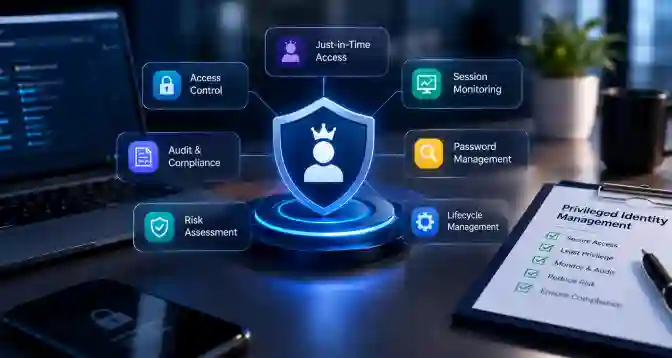
Privileged identity management helps close that gap by controlling who receives powerful access, why they need it, and when it must end. The goal is not simply to manage accounts, but to ensure that power never outlives its purpose.
What Actually Happens Without Privileged Identity Management

Admin accounts have more power than regular user accounts. They can manage servers, cloud services, databases, and business apps. When a company does not have clear access rules, it becomes harder to know who has these rights and why they have them.
A privileged identity management system gives teams a way to keep these accounts under control. It records access requests, approvals, account changes, and user activity. Without these records, old permissions and shared passwords can leave important systems exposed.
Permanent Access Creates Long-Term Risk
Some employees keep admin rights even after moving to a different role. These permissions may stay active for months or even years. The problem is simple: if an attacker steals one of these accounts, they may get access to systems that should no longer be available to that employee.
- Old Admin Rights: An employee may still have admin access after changing jobs within the company. They may no longer need these rights, but nobody may have removed them.
- More Ways In: A stolen admin account can give an attacker the power to change settings, create new accounts, or access private company data.
- Poor Access Reviews: Teams may not know which admin accounts are still active, who manages them, or why they need such high-level access.
One way to reduce this risk is to use zero standing privileges. Under this approach, users do not keep powerful access all the time. They receive it only when a task requires it, and the access ends when it is no longer needed. You can learn more about zero standing privileges and how this approach can reduce long-term access risks.
This idea also comes up in Arjen Everaers' LinkedIn post about modern Privileged Access Management. He explains how permanent permissions can give attackers more room to move through company systems. His post also discusses using Zero Standing Privilege (ZSP) and Just-in-Time (JIT) Access to limit that risk.
Shared Accounts and Poor Records Hide Activity
When several people use the same admin account, finding out who made a change becomes difficult. If something goes wrong, the security team may have no clear way to identify the person behind that action. This can also create trouble during audits.
- No Clear Owner: Some admin and service accounts may not have a known owner. Teams may not know who should manage them or review their access.
- Shared Passwords: Employees may send admin passwords through email, chat, or shared files. This makes it difficult to control who knows the password.
- Missing Activity Logs: Without proper records, teams may not know who changed a setting, when the account was used, or what actions were taken.
A good privileged identity management solution should link every account to a responsible person or team. For shared accounts, it should also help identify the individual users and track their actions through proper logging and monitoring. It should also keep a record of access requests, approvals, changes, and important actions.
This problem also appears in a Reddit discussion about Privileged Access Management (PAM). The original poster, who says they have worked with several PAM providers, explains why identity matters as companies move beyond the old network security model.
The discussion also highlights the need to understand who uses privileged accounts and how they access company systems.
When to Revisit Your Privileged Identity Management Setup
Access needs do not stay the same forever. As a company grows, it may add cloud services, new apps, remote employees, or outside vendors. Each change can bring new accounts and new reasons for giving someone admin access.
It may be time to review your privileged identity management software if your team cannot track admin accounts, permissions stay active longer than needed, or employees still handle most access requests by hand.
Your Environment Has Changed
A company may run many systems across its network and cloud setup. An older tool may not support all of them. As a result, some admin accounts may not receive the checks and protection they need.
- New Cloud Services: Cloud platforms, containers, and workloads can create new admin roles. Your existing access rules may not cover these roles.
- More Business Apps: New apps may come with their own admin accounts. These accounts also need clear owners and proper access rules.
- Outside Vendors: Vendors may need access to repair a system or complete a task. Their access should have a clear purpose and an end time.
It is worth reviewing your setup after a major change, such as moving to the cloud, merging with another company, launching a new app, or changing vendor access.
The PAM best practices guide explains several areas that deserve attention, including account discovery, least privilege, MFA, access reviews, and session monitoring.
Access Reviews Find Gaps in Old Rules
Access reviews help teams find permissions that employees no longer need. They can also show where approval requests get stuck or where removing access takes too long.
- Old Role Access: Check whether employees still need the admin rights they received in earlier roles. Remove permissions that no longer match their current work.
- Long-Term Permissions: Look for access that stays active for weeks or months without a clear reason. Temporary access is a better choice when a task does not need permanent rights.
- Late Reviews: Make sure managers and system owners check access on time. Keep a record of their decisions so the company knows what was reviewed and what changed.
Temporary access gives teams more control over powerful permissions. Instead of allowing users to keep extra rights, the team can review each request and provide access only when the work calls for it.
What to Ask a Privileged Identity Management Vendor Before You Shortlist

A product demo can look impressive, but that does not tell you how well the tool will work with your own systems. You need to understand how it finds admin accounts, handles approvals, protects credentials, and records user actions.
Do not choose privileged identity management tools by counting features alone. A tool may offer many features and still fail to meet your needs. What matters is whether it fits your systems, security rules, team, and audit requirements.
Can the Product Find and Control Every Privileged Identity?
Start by asking which accounts the product can find and protect. Some tools mainly cover employee admin accounts. Others may also support service accounts, cloud roles, and machine identities.
- Account Discovery: Ask how the tool finds admin accounts across servers, databases, cloud platforms, directories, and business apps.
- Identity Coverage: Check whether it supports employees, vendors, service accounts, applications, and other non-human identities.
- Access Rules: Find out how it applies least privilege, role-based access control (RBAC), approval steps, and access time limits.
The vendor should be clear about which accounts the product can manage and where you may still need another tool or manual work.
You can also compare the available features with this guide to PAM solutions before making your shortlist.
Does It Support JIT, Session Monitoring, and Audit Needs?
Temporary access should be easy to request and safe to use. A user should receive permission for an approved task, complete the work, and lose those extra rights when the approved time ends.
- Just-in-Time Access: Ask whether users can receive admin rights for a limited time. Check whether the system removes those rights automatically when the approved period ends.
- Session Checks: Find out whether the tool can record admin sessions and track important actions. These records help teams see what happened during a task.
- Audit Reports: Ask whether it stores access requests, approvals, policy changes, and session records. Also check whether your team can export these records for audits.
There is one more thing to check: how well does the product connect with your existing tools?
Ask the vendor about integration with your identity provider, ticketing system, cloud services, and security tools. A good privileged identity management system should fit your current setup and reduce manual work rather than create more of it.
Decide Who Owns Privileged Access Before the Next Audit Does
A security tool cannot make every access decision on its own. People still need to decide who can approve requests, who manages each account, and who checks its permissions.
Without clear ownership, requests can be missed and old permissions can remain active. Clear responsibilities also make audits easier because the company can show who approved access and why it was needed.
Give Each Privileged Identity a Clear Owner
Every admin account should have a person or team responsible for it. This includes emergency accounts, service accounts, and machine identities.
- Name Account Owners: Record who manages each privileged account and which system or service it controls.
- Set Approval Roles: Decide who can approve access requests. High-risk requests may need approval from both a manager and a system owner.
- Check Ownership Often: Review account owners when employees leave, teams change, or systems move. Update the records so every account has someone responsible for it.
This connects privileged identity and access management with clear business responsibilities. It also makes access reviews easier because teams know who should check each account.
Set Rules for Human and Non-Human Access
Employees are not the only ones that need access to important systems. Apps, scripts, workloads, and services may also use accounts or keys to connect with business tools. These identities need clear owners and limited permissions just like human users.
- Control Employee Access: Give employees and vendors only the rights they need for approved tasks. Use temporary access when permanent admin rights are not required.
- Secure Machine Access: Track service accounts, API keys, certificates, and workload identities. Replace old secrets and remove credentials that are no longer in use.
- Keep Access Records: Record who requested access, who approved it, which permissions were given, and when they ended.
A privileged identity manager should help teams apply these rules across all supported systems. It should also make it clear when a person needs to approve a request and when the system can handle it automatically.
Where Infisign UniFed Fits
UniFed is Infisign's customer identity and access management (CIAM) platform. It is important to understand that UniFed is not a replacement for privileged access management software. It can support customer login and access needs alongside a company's existing privileged access controls.
- Customer Sign-In: UniFed supports single sign-on (SSO), social login, email OTP, and passwordless options. These features help customers sign in to connected apps.
- Access Security: Features such as multi-factor authentication (MFA), conditional access, and attribute-based access control (ABAC) help apply access checks based on the user and their sign-in context.
- Identity Management: User provisioning, directory sync, APIs, and SDKs help teams manage customer identities and connect sign-in features with their apps.
Your identity security strategy needs more than separate tools. Infisign UniFed brings customer identity and application access into focus, while privileged access controls help protect critical systems from unnecessary permissions.
See how these capabilities fit your security needs. Explore Infisign with our team.
FAQ
1. What is the difference between privileged identity management and privileged access management?
Privileged identity management focuses on managing privileged identities and controlling access to higher-level roles. Privileged access management focuses on securing privileged accounts and controlling how they are used. Both can have similar features, and some solutions offer both identity management and privileged access control. Both help companies reduce security risks and prevent the misuse of powerful accounts.
2. How does just in time access work in privileged identity management?
Just-in-time access gives a user extra permissions for a short, approved period. When the task is complete or the approved time ends, the system removes those permissions automatically.
3. How do you manage privileged access for non human identities?
Start by listing service accounts, workloads, and app identities. Give each one a clear owner and only the permissions it needs. Protect its secrets, change old credentials, and remove access that is no longer required.
4. What are privileged identity management best practices?
Use least privilege, temporary access, strong sign-in checks, clear account ownership, regular access reviews, session records, and safe secret storage. Apply these rules to both human and machine identities.
5. What are the challenges of privileged identity management?
Common problems include hidden accounts, shared passwords, old access rights, complex systems, and unclear account ownership. Service accounts and older applications can make the work even harder.


