

Modern apps need more than a basic login screen. Businesses now deal with customer onboarding and MFA at the same time. Teams manage passkeys and SSO as products grow larger. Authentication systems often become harder to scale and maintain after user activity increases.
Descope is a newer CIAM platform focused on passwordless authentication and customer identity management. In this Descope review, we looked at official product capabilities and pricing structure.
We also checked user feedback and implementation factors to understand where the platform works well and where some businesses may later need broader identity management across users, systems, and environments.
What Is Descope?
Descope is a customer identity platform that helps apps create safe login and sign-up systems with tools like passkeys, MFA, social login, and passwordless authentication. Businesses use it to manage user access more easily because building modern authentication systems from zero can take a lot of developer time and security planning. The company also received recognition in the 2025 Gartner Magic Quadrant for Access Management.
- Customer Login System. Descope is mainly a CIAM solution built for customer-facing login and identity workflows. It helps businesses decide who can enter the app and what users can access after signing in.
- Easy Flow Builder. Teams can build login journeys with drag-and-drop blocks instead of writing everything by hand. This helps developers move faster when product changes happen later.
- Developer Tools. The platform gives APIs, SDKs, and ready-made login parts together. Developers can start quickly and still change things when needed.
- Modern Security Focus. Descope focuses strongly on passkeys, MFA, and passwordless authentication because traditional password-based systems often create security and usability challenges for modern applications.
Who Should Consider Descope?
Some companies want simple login systems. Some want smart and flexible identity tools. Descope mostly works well for teams building modern apps with many users.
Good fit:
- B2C Apps. Descope works well for customer-facing apps that need smooth signup and login experiences. Passwordless authentication and social login options help reduce friction for users.
- SaaS Onboarding Flows. SaaS companies can build onboarding journeys faster with visual workflows and ready-made authentication tools. Product teams can improve user activation without spending too much time on backend setup.
- Multi-Tenant Products. Descope supports tenant-aware authentication and SSO features. This makes the platform useful for SaaS products serving multiple customer organizations.
- Developer-Centric Teams. Developer-focused organizations may like the platform because it offers flexible developer tools and customizable identity workflows. Teams can adjust authentication journeys without rebuilding the entire system from scratch.
Poor fit:
- Very Small Projects. Tiny apps with only basic login needs may feel the platform is bigger than what they really need.
- Old Enterprise Systems. Legacy infrastructure can make integration harder because modern CIAM systems work differently from older identity setups.
- Budget-Focused Startups. Some companies may worry about long-term pricing as user numbers grow bigger.
- Basic Login Needs. Businesses needing only email-password login may never use many advanced features inside the platform.
Descope Key Features
Making login systems from zero can feel hard and slow. Descope gives ready-made login tools so teams can build things faster. Companies can create safer login experiences without doing all the work by hand.
- Passwordless Login. Descope supports passkeys, OTPs, and magic links so users can log in without depending only on passwords. Faster login flows can improve user experience and reduce password reset problems for support teams.
- Social Login and Biometrics. Users can sign in with Google, Apple and other social accounts. The platform also supports fingerprint and face login which makes app access feel easier on modern devices.
- Visual Workflow Builder. Teams can create login, signup, and recovery flows with drag-and-drop blocks. Product teams can update user journeys faster without rewriting backend code every time.
- Adaptive MFA . Descope checks login risk signals before asking for extra verification. This helps companies add stronger security without making trusted users repeat extra login steps all the time.
- Step-Up Authentication. The platform can ask for extra verification during sensitive actions like payment changes or admin access. This helps protect important actions without slowing down every normal login session.
- SSO Integrations. Businesses can connect identity providers with SAML and OIDC integrations. This makes it easier for users to access apps with existing company login systems.
- SCIM Provisioning. Descope supports SCIM provisioning for user and access management. Teams can automate account creation updates and access removal across connected systems.
- Agentic Identity Hub. Descope provides authentication, authorization, and access control tools for AI agents and MCP servers. Companies can control what AI agents are allowed to access across apps, tools, MCP servers, and enterprise workflows using granular policies and scoped credentials.
Descope Pricing Breakdown
Identity pricing looks small in the beginning. Things become different when more users enter the app and security rules grow bigger. Descope gives multiple plans for different business stages from solo builders to large enterprises.
Descope pricing mainly depends on monthly active users, tenant limits, SSO connections and support needs.
- Free Plan Flexibility. Small teams can test authentication flows without paying in the beginning. This helps developers learn the platform before moving to larger plans.
- Startup Scaling Support. The Pro plan gives more room for growing products with higher user and tenant limits. Early-stage SaaS companies may find this useful during product growth.
- Growth-Stage Features. The Growth plan supports larger authentication workloads and enterprise onboarding needs. Bigger SaaS products often need stronger identity controls as more customers join.
- Enterprise-Level Control. Enterprise plans include custom deployment options, advanced support and scalability controls. Large organizations may need this level of flexibility for complex security environments.
Where the Pricing Gets Tricky
Identity platforms usually feel cheap before real growth begins. The hard part comes later when apps get more users, more login requests and more security rules. Descope cost becomes harder to predict when businesses scale quickly or need advanced enterprise controls.
- User Growth Changes Costs. More users create more authentication requests, MFA checks and support needs. Small startups sometimes miss this during early budgeting because growth feels exciting before bills become larger.
- Enterprise Features Add Pressure. Advanced governance custom workflows and premium support may increase pricing later. Bigger companies often need these controls for compliance and security operations.
- Custom Contracts Feel Different. Some businesses may receive different pricing structures depending on usage size and support expectations. This can make long-term planning harder for finance teams.
- Migration Is Expensive. Identity systems become deeply connected with apps after deployment. Changing providers later usually takes time, engineering effort and money.
Descope Pros: What Users Love
People feel happy with login systems when things work fast and do not create stress. Many Descope users say the platform makes authentication work easier for developers and smoother for customers. Teams also like having more freedom to change login journeys when products grow bigger later.
- Fast Setup Experience. Reviewers often say the visual builder saves time because teams can create login flows without building every small thing from the beginning. This helps developers finish work faster.
- Modern Login Choices. People like passkeys, MFA, and passwordless login because users can enter apps more easily without always remembering passwords.
- Helpful Developer Tools. Some reviewers say the APIs, SDKs and documentation feel easier compared to older identity systems. Clear tools help developers feel less confused during setup.
- Flexible User Flows. Businesses like changing onboarding and authentication journeys for different users because every app does not work the same way.
Descope Cons: Where It Falls Short
No identity platform feels perfect for every company. Some reviewers say modern authentication flexibility also creates learning pressure during setup. Others mention pricing predictability and advanced configuration challenges.
- Learning Takes Time. Some teams say workflow orchestration feels confusing in the beginning especially for developers new to CIAM systems.
- Pricing Predictability Feels Hard. Businesses sometimes struggle to estimate future spending before user traffic becomes stable.
- Legacy Systems Need More Work. Older infrastructure may require longer migration planning because modern authentication architecture behaves differently from traditional CIAM systems.
- Advanced Features Feel Heavy. Descope limitations discussions sometimes mention that smaller teams may never use many enterprise-level orchestration capabilities available inside the platform.
Descope User Reviews
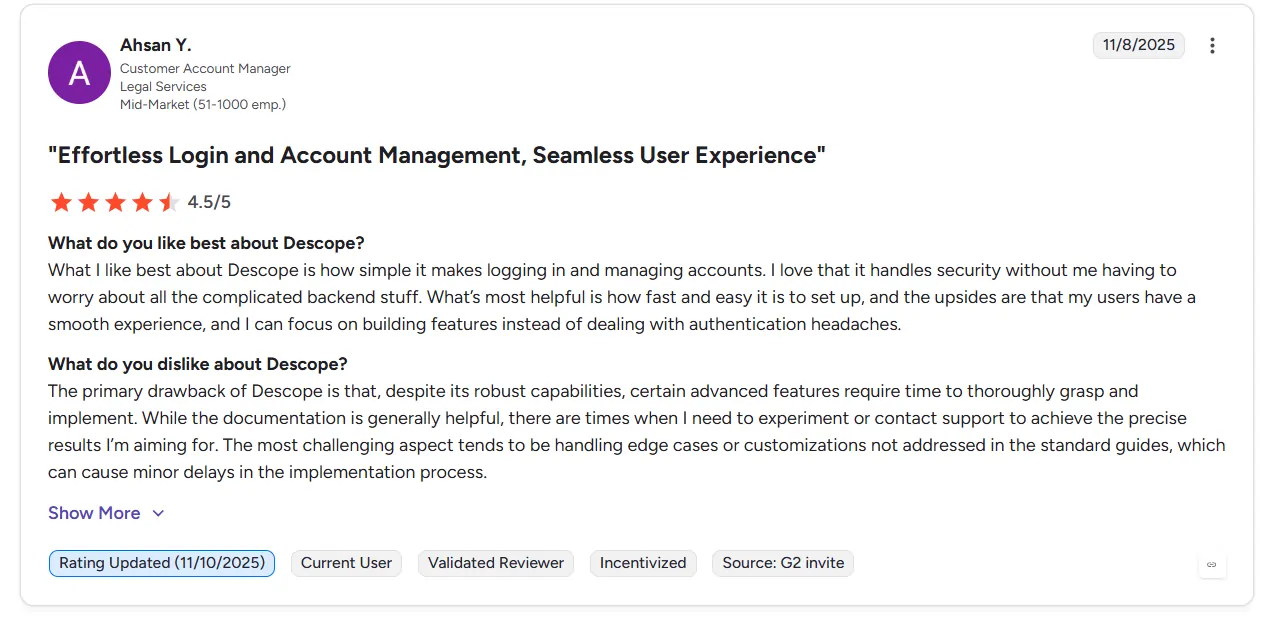
- Developer Experience. Many G2 users say Descope helps teams move faster because authentication flows are easier to build and customize.
- Flexible Authentication. Reviewers often praise passwordless support, MFA flexibility and workflow orchestration.
- Learning Curve Feedback. Some users mention that onboarding takes time when teams are new to modern CIAM systems.
Descope Alternatives Worth Evaluating for SMBs
Small and mid-sized businesses usually want identity platforms that feel secure and easy to scale. Different companies often compare platforms based on setup flexibility and long-term management needs.
- Amazon Cognito. Amazon Cognito is commonly used by businesses already working inside the AWS ecosystem. Many teams choose the platform for scalable authentication, user management and deep AWS integration across cloud applications. Some smaller companies may find the setup and configuration process more technical compared to simpler identity platforms.
- FusionAuth. FusionAuth is commonly used by businesses wanting more control over deployment and authentication management. Many companies choose the platform because it supports self-hosting, flexible customization, and hybrid deployment environments. Some teams may still need stronger developer involvement during advanced setup and configuration.
- Clerk. Clerk is commonly used by startups and frontend-focused product teams building modern web applications. Many businesses choose the platform because onboarding, authentication, and frontend integration feel fast and lightweight. Some organizations may want broader enterprise identity management features as products become larger.
Descope vs Infisign UniFed
Descope
- Main Focus. Descope mainly helps apps manage customer signup and login flows. The platform focuses on customer authentication for SaaS apps and digital products.
- Authentication Style. Descope uses visual workflows, APIs, and SDKs to make login flows easier to build. The platform also focuses on passkeys, passwordless login, MFA, and fraud protection.
- Best Environment. Descope works best for modern SaaS apps, partner portals, and cloud-based products.
- Main Teams Using It. Product teams and developers often use Descope because login journeys can be changed without building everything again.
Infisign UniFed
- Main Focus. Infisign UniFed helps businesses manage workforce, customer, and non-human identities from one platform. The system supports cloud, hybrid, on-prem, and legacy environments.
- Authentication Style. Infisign UniFed focuses more on SSO, MFA, conditional access, and identity federation across different systems.
- Best Environment. Infisign UniFed works well for companies managing many identity providers, enterprise apps, and older infrastructure together.
- Main Teams Using It. IT and security teams often use Infisign UniFed to manage user access and identity operations across the company.
Is Descope Right for You?
Every company wants two things together. Easy login for good users and hard walls for bad people. Descope tries to do both without making developers build everything from the beginning. For many growing apps that feels helpful.
For some businesses it may feel like more systems than they actually need right now.
- Good For Growing Products. Teams building apps for many users may like how quickly login flows can be created. Less time goes into authentication work and more time goes into improving the actual product.
- Nice For Modern Login Styles. Passkeys, MFA, and passwordless journeys already exist inside the platform. Users usually enjoy apps more when login feels fast and simple instead of stressful.
- Works Better For Some Teams Than Others. Product-focused companies may enjoy the flexibility here. Businesses handling many identity systems vendors, workforce apps and older infrastructure may later want broader identity control in one place.
- Think About The Future Early. Identity systems become hard to replace after full setup. Smart teams usually think about scaling governance and long-term management before choosing any authentication platform.
As products grow, identity management often becomes harder to handle across apps, teams, and access workflows. Businesses wanting a setup that feels more manageable over time can book your demo with Infisign and see how the platform handles modern identity environments.
FAQs
Is Descope better than Auth0?
Descope and Auth0 both support modern CIAM capabilities like MFA, passwordless login, and social authentication. Descope feels stronger for visual workflow building and faster onboarding customization. Auth0 still has a larger enterprise ecosystem, broader integrations, and longer market presence, which makes it common among larger enterprise environments.
How long does Descope take to implement?
Small projects can often start within days because Descope provides ready-made workflows, SDKs, and APIs. Larger enterprise deployments may take several weeks depending on migration complexity, SSO integrations, identity federation requirements, and compliance planning. Older IAM migrations may also require additional setup and testing before full deployment.
Does Descope handle AI agent / MCP authentication well?
Yes. Descope supports authentication and access management for AI agents and MCP servers. The platform provides tools for credential management, policy enforcement, and access control across AI-driven environments. This helps companies manage what AI systems can access inside apps, APIs, and modern software workflows.