

The sign-in system is a key part of every app. Many teams start with Firebase Authentication because it allows for a fast launch. This choice works well in the early stages of development. As a project grows, the technical needs of the app naturally shift.
Planning for budget management and data portability becomes important at that stage. Maintaining full ownership of user data helps keep the infrastructure flexible.
This focus on independence supports steady growth. It also helps teams stay in control of the technical stack as project requirements change over time.
What Is Firebase Authentication?
Firebase Authentication is a login system by Google that helps verify your users so you can focus on building features. While it secures sign-ins please remember that total app safety also requires you to handle authorization and backend security plus API protection along with secure coding and infrastructure controls.
If you need advanced enterprise-grade requirements, you can easily switch to the Identity Platform to unlock features like SAML, OIDC, and Multi-Factor Authentication (MFA), making it fully capable of handling complex corporate identity needs.
- Flexible Access. You can quickly launch multiple Firebase authentication methods like email links and Google logins. This gives your users choices.
- Top Security. The platform manages passwords and digital tokens automatically behind the scenes. This helps reduce common security risks and protects user data.
- Instant Scaling. Firebase is highly scalable and supports your business growth from ten users to millions while managing server performance effectively. Keep in mind that your actual scalability also depends on your app architecture and Google's project quotas.
Who Should Use Firebase Authentication?
Top software platforms like G2 and Capterra show that this tool fits fast-growing teams perfectly. A recent firebase review reveals that it is the ultimate choice for creators who want to avoid messy server setup. This platform helps you deploy your login screens quickly and effortlessly.
- App Startups. New companies use this tool to launch their software into the market fast. It provides a free tier that supports your early growth without any initial cost.
- Mobile Creators. Developers building iOS or Android apps get optional pre-built UI components that speed up development. Note that these are not complete interfaces for all platforms so you may still need to customize parts of your design.
- Independent Developers. Solo engineers use Firebase Authentication to handle login logic without building a custom backend. While it streamlines user management you will still need a solid grasp of infrastructure to maintain a production-ready app as your user base scales to millions.
- Enterprise Teams. Large organizations choose this infrastructure to connect their services with Google Cloud smoothly. This native link makes your data management secure and reliable.
Firebase Authentication Key Features
Firebase Authentication helps you manage your app’s login system without writing complicated code. For apps that need extra security and professional-grade features, you can easily use the Identity Platform upgrade path to get more control. This ensures your app stays secure and professional as it grows.
Core Authentication Capabilities
Firebase makes it easy for users to sign up using email, passwords, phone numbers, or social media accounts. Users can also link different login methods to one profile, which makes signing in a smooth experience. For developers, this means much less work in handling user credentials and keeping them logged in.
Advanced Security with Identity Platform
When your app needs higher protection, the Identity Platform connects with Google Cloud integration to provide these professional tools:
- Multi-Factor Authentication (MFA). Adds an extra layer of security by requiring a second check, like a code from your phone, to stop unauthorized access even if someone steals a password.
- Passkeys support. Lets users log in using face scans or fingerprints instead of typing passwords, which is both safer and faster.
- OpenID Connect support. Makes it simple to connect your app with other popular login services to keep authentication consistent across different platforms.
- SAML support via Identity Platform. Essential for business apps, allowing your users to log in using their own company’s internal login system.
- Custom Authentication. Allows you to connect your existing user database to Firebase by creating secure custom tokens that Firebase can verify.
Deep Management and Customization
The Identity Platform gives you better control over your users and their data through these tools:
- Custom Claims. Lets you attach special labels to user accounts, such as "admin" or "subscriber," so your app knows exactly what each user is allowed to do.
- Session Management. Gives you control over active logins, including the ability to kick out suspicious users to keep accounts safe.
- Tenant management. Perfect if you run a business for other businesses, as it lets you keep different clients' user data completely separate in one project.
Firebase Pricing: What It Actually Costs at Scale
Google separates its cloud service into two simple choices depending on your business size. The entry plan remains free for small projects and initial testing. Moving your application to production unlocks unlimited growth through their pay-as-you-go model.
Cost Overview Table
- Free Package. The starter option allows you to manage 50000 monthly active users without paying anything. This tier lets you test features safely without adding any payment method to your account.
- Paid Growth. Switching to the premium plan unlocks higher usage levels and gives you $300 in free credit. You can track your Firebase pricing setup easily because it includes your free usage limits every single day.
Firebase Authentication Pros and Cons
Real user feedback reveals exactly how this security tool performs during daily operations. Every honest firebase review highlights that creators love the rapid setup speed but sometimes feel restricted by the system limits. Weighing these actual platform advantages and disadvantages helps you decide if the setup fits your digital project perfectly.
Pros
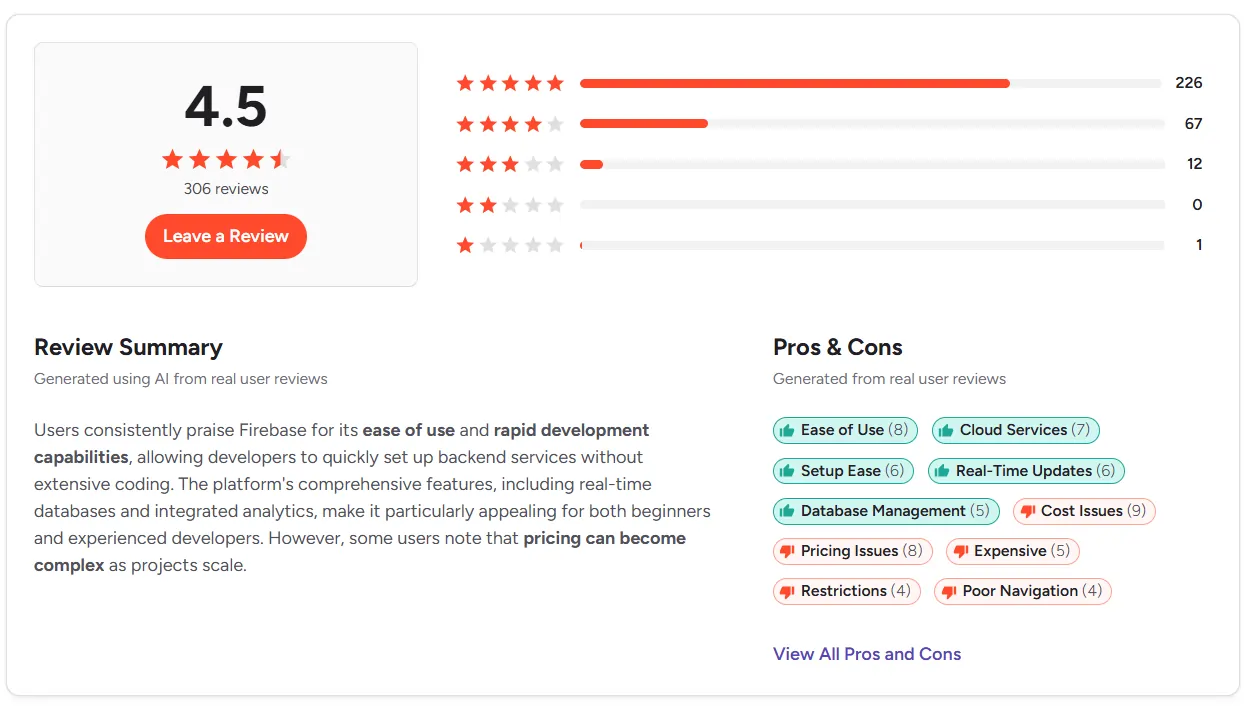
- Fast Setup. Building your login system takes minutes because Google handles the heavy configuration work behind the scenes. This saves your team from writing repetitive backend code to check user identities.
- Helpful Free Plan. The platform offers a very generous free option alongside clear setup guides for your team. This simple layout makes the tool a top choice for launching new mobile apps easily.
- Seamless Google Integration. It connects flawlessly with the broader Google Cloud ecosystem for smooth data flow and service connectivity.
- Native Realtime Capabilities. Authentication state syncs instantly across devices which simplifies development for live features like chat.
Cons
- Confusing Costs. Understanding your exact bill can feel slightly difficult because each independent feature carries its own price tag. This pricing model can confuse new creators as their user base expands over time.
- Vendor Lock-in. Relying on the Google ecosystem creates a dependency but this is mitigated because Firebase supports full user data exports.
- Navigation Friction. The interface is sometimes fragmented requiring you to jump between different consoles to find specific settings.
- Limited Customization. The system is built for ease of use which can feel rigid for developers needing highly specific or non-standard auth logic. However, this limitation applies mostly to the standard tier; upgrading to the Identity Platform provides full enterprise federation support, including SAML and OIDC.
What Real Users Are Saying (Firebase Customer Reviews)
Checking online feedback helps you see exactly how this tool feels during daily work across different team sizes.
What G2 Users Say About Firebase
G2 reviews for Firebase Authentication provide valuable insights into how developers and businesses experience the platform in real-world environments.
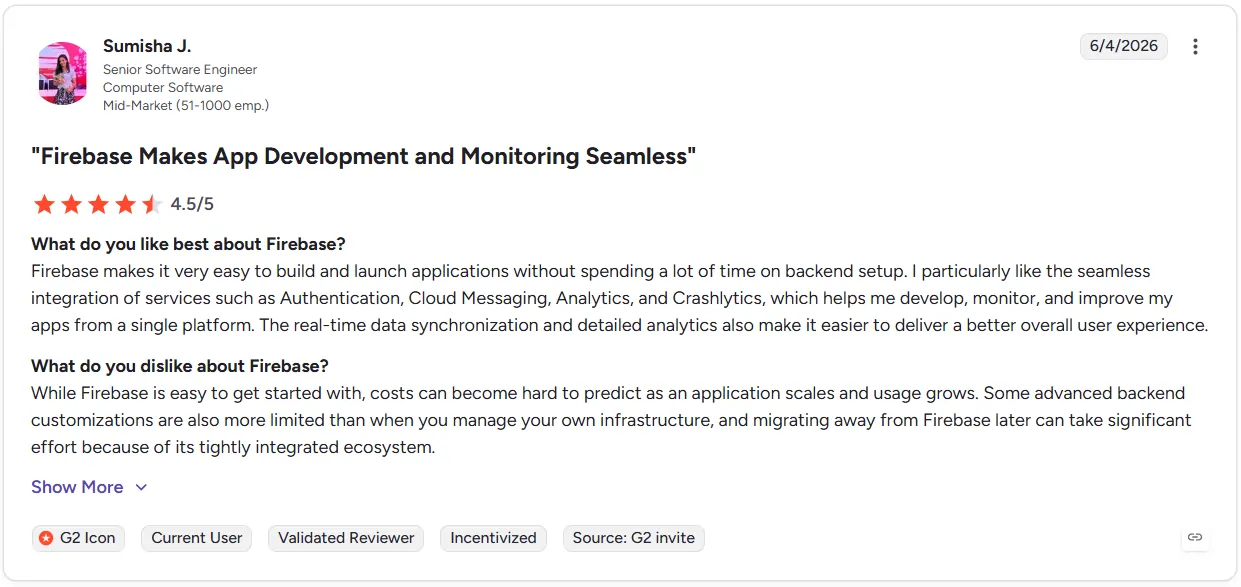
- Integrated Ecosystem. Creators value managing authentication and storage plus analytics under one roof. This removes the friction of juggling separate accounts across different providers.
- Scaling Cost Uncertainty. Users often note that project expenses become difficult to predict as they grow. Because features are billed separately forecasting monthly costs often becomes a challenge for expanding teams.
Firebase Ratings and Feedback on Capterra
Capterra reviews of Firebase offer real-world insights into the platform's performance, usability, and overall user experience.
- Fast Development. Reviewers frequently highlight that the platform enables rapid prototyping. Because it provides a pre-built infrastructure for authentication and databases teams can launch functional applications much faster than building from scratch.
- System Integration. Users appreciate that the platform works well within the Google environment. While this is helpful for many, some reviewers mention that the "lock-in" feeling is a disadvantage, as migrating away from the platform can be a complex task for maturing projects.
Firebase Alternatives Worth Considering for 2026
If you want to step away from the Google ecosystem, looking into modern firebase alternatives helps you find platforms with more flexible setups and more transparent pricing rules for your growing application.
- Clerk. This is a perfect choice for websites that need ready-made login pages fast. The Hobby plan lets you start for free with 50,000 monthly retained users per application and no credit card required. As you scale, the Pro plan charges $0.02 for each additional user beyond that limit. For larger organizations that need features like extra dashboard seats, priority support, or SOC2 compliance, you can move to the Business or Enterprise plans.
- SuperTokens. This platform works best for teams that want complete ownership of their user lists without paying high costs per account. The best advantage is that it lets you host all data on your own computers to protect privacy and avoid getting locked into one company. The main negative point is that it requires manual setup work to connect with your server and lacks instant business settings out of the box.
- WorkOS. WorkOS is ideal for apps that want to sell their products directly to large business corporations. A major highlight is its generous free tier, which covers up to 1 million monthly active users for standard authentication. The main consideration is its connection-based pricing for enterprise features like SSO and Directory Sync. Since you pay per connection for every corporate customer you onboard, costs can scale significantly as your business grows and you add more enterprise clients.
Firebase Authentication vs Infisign
While both platforms handle user identities, they target different stages of a project's lifecycle. Firebase focuses on rapid, consumer-facing development (B2C), whereas Infisign is built for sophisticated CIAM and IAM requirements, including B2B multi-tenancy and advanced security standards.
Identity Feature Comparison
Is Firebase Still Worth Using in 2026?
The way we build apps is changing fast. For many teams, traditional all-in-one cloud setups remain highly valuable because they offer a familiar, fast starting point for simple projects. At the same time, a growing focus on giving businesses full control over their own information is opening up new, modern paths for long-term growth.
Security Setup Comparison
Key Areas to Consider
- Data Ownership. Firebase Authentication provides a smooth start by centralizing your user identity management within their ecosystem. As your project grows you may want more control over your identity setup like the ability to export user records or manage authentication logic independently. This flexibility ensures you keep full ownership of your user data if you decide to move to a different provider in the future.
- System Tracking. The built-in screen works great for finding everyday app bugs and viewing simple visitor charts. While this keeps early test apps steady, businesses handling highly sensitive information eventually naturally move toward tools with more automated tracking.
- Password Security. Standard login forms are highly familiar to users everywhere. However, because typed words carry natural human risks like weak or shared choices, modern setups are gently shifting away from text lists to stay ahead of online safety needs.
- User Privacy. Traditional login methods use passwords stored by providers which creates security risks. Modern passkeys verify your identity locally on your device using biometrics. This ensures your credentials stay in your possession and are secure.
- App Integration. The platform handles early expansion reliably. Choosing an open architecture simply allows you to link thousands of workplace tools together under a single shield in a few hours, helping the business scale without managing complex connections.
Infisign UniFed addresses the common frustrations of legacy identity platforms by removing the friction of complex password management. It replaces outdated credentials with secure biometric authentication on the user's own device. Beyond simple logins, it eliminates the rigid vendor lock-in of traditional identity tools by giving your business full control over your identity data while unifying all your applications under one manageable system.
Keep your data in your own hands while making logins effortless. Book a quick look on the Infisign Demo Page to upgrade your system today.
FAQs
What are the main disadvantages of using Firebase Authentication?
Using a proprietary identity system often leads to vendor lock-in because your user data is tied to a specific provider’s structure. This makes future migrations complex and prevents you from having full control over your own identity infrastructure as your scaling costs increase.
What are the main limitations of Firebase Authentication?
While standard identity tools offer basic customization and integrations, they often become a burden. Managing complex UI tweaks, fragmented APIs, and scattered logs creates unnecessary work. This traps your engineering team in platform maintenance, pulling them away from building the core product features your business actually needs to grow.
Is Firebase Authentication actually free?
Firebase Authentication offers a free tier, but scaling quickly leads to costs. Once you exceed 50,000 monthly active users or use features like Phone Auth, you transition to pay-as-you-go pricing, increasing operational expenses.
Is Firebase Authentication secure enough for production?
Yes, Google keeps the door locked safely against everyday online risks. However, it lacks the deeper privacy shields and personal data control that businesses need when handling highly sensitive files.