

Every business wants people to feel safe when they log into apps and systems. miniOrange is an IAM platform that provides SSO, MFA, and identity management for businesses that need centralized authentication across cloud and on-premise systems.
This miniOrange review explains how miniOrange helps businesses manage logins and user access from one place. Many companies like the platform because it works with different business apps and gives stronger protection for everyday logins.
Some users also feel the platform takes time to understand in the beginning. In the end good security is about protecting people without making daily work harder.
What Is miniOrange?
miniOrange Xecurify is an identity and access management (IAM) platform that helps businesses manage authentication, user access, and login security from one place. The platform supports Single Sign-On (SSO), Multi-Factor Authentication (MFA), passwordless authentication, and identity management across cloud and on-premise environments.
Businesses use miniOrange because it works with apps, websites, VPNs, and legacy systems. Companies managing multiple tools often use the platform to centralize authentication and improve access security for employees and customers.
miniOrange was also recognized as a “Strong Performer” in Gartner Voice of the Customer 2025 for Access Management, based on customer feedback and reviews.
- Unified Access. miniOrange lets businesses manage logins and user access through one system. Teams do not need to deal with many separate login tools which makes work simpler and safer.
- Broad Integrations. The platform works with tools like WordPress and VPNs. It also connects with many business apps and older systems so companies do not have to replace everything they already use.
- Scalable Security. Many SMBs choose miniOrange because they can start with basic security features and add more protection as the business grows.
miniOrange Key Features
miniOrange helps businesses manage employee logins and customer access in one place. Good security should make work feel easier, not stressful. That is why the platform focuses on simple login management for teams using many apps and systems every day.
- Single Sign-On. People can log in one time and move between apps without typing passwords again and again. miniOrange also works with many business tools and legacy systems.
- Multi-Factor Authentication. The platform supports OTPs and push notifications for daily login protection. Businesses can also use biometrics and hardware security keys for extra account safety. Many teams searching for miniOrange mfa solutions choose these features because passwords alone no longer feel enough.
- Passwordless Authentication. Users can sign in using Face ID, Touch ID, passkeys, and WebAuthn instead of relying only on passwords. miniOrange also supports FIDO2 and WebAuthn-based authentication, which can help reduce phishing risks through cryptographic authentication tied to trusted devices.
- User Provisioning. miniOrange can automatically create and update user accounts across connected systems. IT teams save time because user access does not need manual updates again and again.
- CIAM and Plugin Ecosystem. The platform supports customer logins and social authentication for smoother user access. Many businesses first discover miniOrange through a miniOrange plugin search because its WordPress and Atlassian integrations are widely used.
miniOrange Pros: What Users Genuinely Like
People usually value identity platforms when they reduce everyday friction instead of adding more complexity.
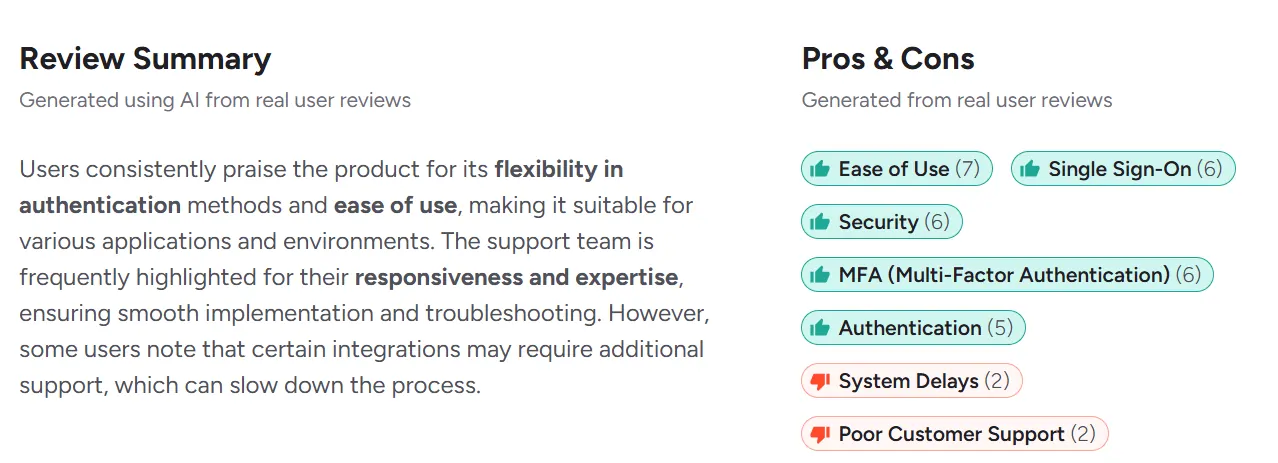
- Flexible integrations. Many users say miniOrange works smoothly with cloud apps and Atlassian products. The platform also connects with VPNs and legacy systems without creating major setup problems. Businesses managing different tools together often see this flexibility as one of miniOrange’s strongest advantages.
- Responsive support. Reviewers frequently mention fast replies and helpful technical guidance during setup and troubleshooting. Several users also praised the support team for helping with custom integrations and deployment issues.
- Reliable authentication experience. Users often describe SSO and MFA flows as smooth after deployment. Businesses looking for miniOrange alternative solutions commonly compare vendors based on login experience because authentication affects employees every single day.
miniOrange Cons: Issues Surfaced by Real Customers
Most criticism around miniOrange comes from usability and setup experience rather than missing security features. Reviews show that the platform gives strong flexibility but can feel harder to manage during advanced configurations.
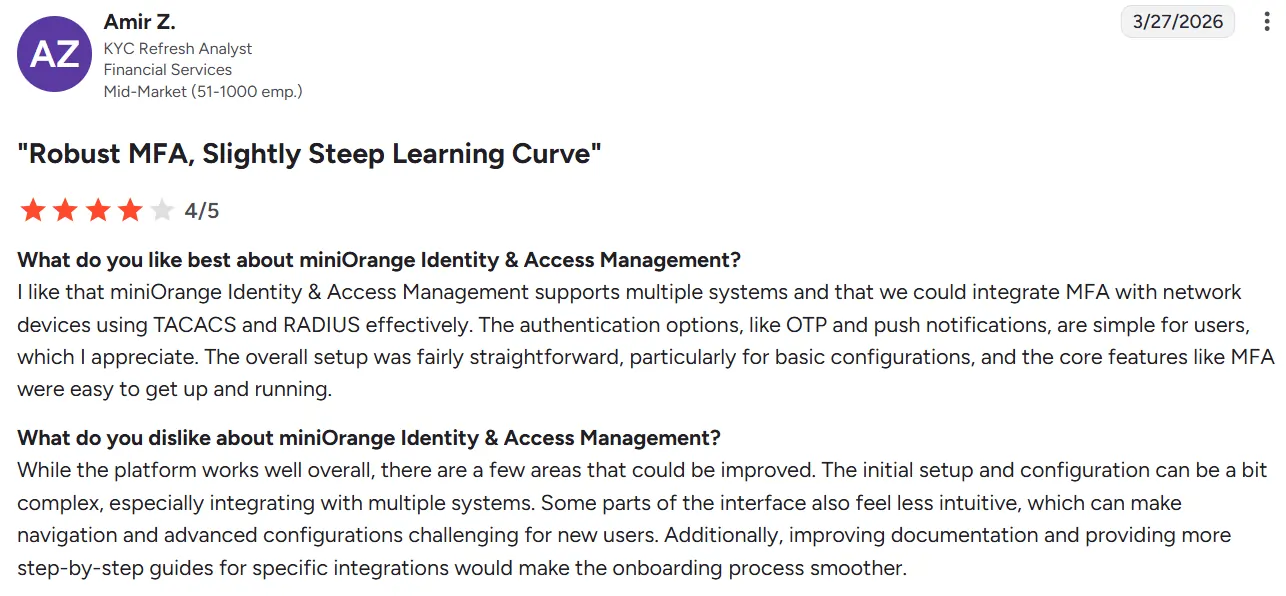
- Admin panel learning curve. Some reviewers mention that the dashboard takes time to understand in the beginning. A few users also felt certain settings could be easier to navigate during daily management.
- Complex setup for advanced use cases. Businesses using custom integrations or legacy systems sometimes needed technical support during deployment. Smaller teams without IAM experience may take longer to configure advanced policies correctly.
- Pricing structure confusion. Some users said pricing can feel difficult to estimate because plugin pricing and IAM pricing are separated across different products. Businesses researching miniOrange pricing details should review licensing carefully before scaling deployments.
miniOrange Pricing: What It Actually Costs
miniOrange uses different pricing plans for its Workforce IAM platform. The pricing depends on the security features and identity management tools included in each plan, such as SSO, MFA, passwordless login, provisioning, and user access management.
The pricing below is based on miniOrange Workforce IAM plans listed on the company’s official pricing page.
Legacy app integrations, workflow-based access, role-based access control, HR-driven provisioning, and user lifecycle management
miniOrange User Reviews: What Independent Platforms Say
Reviews help people understand what happens after using a product in real life. On G2, Gartner, Capterra, and Trustpilot many users like miniOrange for its support and login security. Some users also talk about setup problems and dashboard confusion.
Real reviews help show how a product feels after daily use. Across popular review platforms miniOrange receives positive feedback for its integration support and authentication features. Some users also mention setup complexity and dashboard learning time.
G2 Rating Summary
miniOrange Identity & Access Management has a 4.5/5 rating on G2 based on 28 reviews.
- Strong integrations. Many users say the platform works well with cloud apps and business systems. Companies using different tools together often find the integrations smooth and easy to manage.
- Helpful support team. Reviewers often mention fast replies and technical guidance during setup.
- Some setup complexity. A few users say advanced configurations can take time in the beginning.
Gartner Peer Insights Rating Summary
miniOrange has a 4.7/5 rating on Gartner Peer Insights based on customer reviews.
- Good feature coverage. Businesses like getting SSO, MFA and user management in one platform.
- Works across environments. Users say the platform supports cloud on-premise and hybrid systems properly.
- Learning curve for smaller teams. Some reviewers mention needing support during deployment and policy setup.
Capterra Rating Summary
miniOrange has a 4.5/5 rating on Capterra based on customer reviews.
- Easy authentication management. Users say login management becomes smoother after deployment.
- Responsive support. Many reviewers praise the support team during onboarding and troubleshooting.
- Dashboard confusion for some users. A few reviewers say certain settings take time to understand.
Trustpilot Summary
miniOrange has a 3.2/5 rating on Trustpilot based on 15 reviews.
- Positive support feedback. Some users praise fast replies and helpful onboarding support.
- Plugin-related reviews. Many reviews come from users of WordPress and authentication plugins.
- Mixed customer experience. While some users report smooth deployments others mention support delays and setup frustrations.
Who Should Use miniOrange?
Every business does not need the same kind of security system. Some teams only need simple logins while others manage many apps users and devices every day. miniOrange fits better for businesses that want more control over access and authentication.
Good Fit
- Growing teams. miniOrange works well for businesses adding more employees apps and systems over time. Teams can start with basic security features and add more advanced controls as their needs grow.
- Businesses using many tools. Companies managing different apps and business systems may find miniOrange useful because everything can work together in a smoother way.
- Teams focused on security. Businesses wanting stronger login protection through MFA, passwordless login, and access controls may like the platform.
Poor Fit
- Very small businesses. Teams using only one or two apps may feel miniOrange gives more features than they actually need.
- People want a very simple setup. Some parts of the platform can take time to understand especially for users without technical experience.
- Businesses need only basic login tools. Companies looking for very lightweight authentication may prefer simpler products.
miniOrange Alternatives for SMBs
Small businesses usually want identity tools that feel easy to manage and still give strong security. Most SMBs compare platforms by checking how safe the login system feels, how simple the platform is to use and how much time and money setup may require.
- Okta. Okta is commonly used by mid-size and enterprise businesses managing many apps and users. Many businesses choose the platform for its strong SSO, MFA, and integration support across cloud applications. Some smaller teams also feel the setup, management, and pricing can become complex compared to simpler SMB-focused tools.
- JumpCloud. JumpCloud is commonly used by SMBs that want to manage devices and user authentication from one platform. Many businesses choose it because device management, identity management, and access control work together in a simpler and more organized way. Some teams also find it easier to manage compared to more enterprise-focused IAM platforms.
- OneLogin. OneLogin is commonly used by growing businesses that want simpler SSO and MFA management across cloud applications. Many teams choose it because the platform makes user access and authentication easier to manage from one place. Some businesses also feel it is easier to use compared to larger enterprise-focused IAM platforms.
- Microsoft Entra ID. Microsoft Entra ID is commonly used by businesses already working inside the Microsoft ecosystem. Many teams choose it for SSO, MFA, and user access management across cloud apps and hybrid environments. Some users also feel advanced settings licensing and policy configuration can take time to understand for smaller teams.
miniOrange vs Infisign
miniOrange and Infisign both help businesses manage logins and user access. Both platforms support SSO, MFA, and passwordless login. The real difference comes from how the platforms feel during setup daily use and long-term management.
- miniOrange gives more flexibility. Businesses using older systems may like miniOrange because the platform supports many integrations and plugins.
- Infisign feels simpler. Growing teams wanting modern login security and easier management may find Infisign smoother during daily use.
- Both platforms focus on security. miniOrange focuses more on flexibility while Infisign focuses more on user experience and modern workflows.
Operational Evaluation: How miniOrange Performs Beyond Features
Businesses often check more than login features when choosing an IAM platform. Setup and daily management also matter.
- Deployment Experience. miniOrange works with cloud apps and older systems. Some businesses need technical help during advanced setup.
- Admin Experience. miniOrange gives one dashboard for access management and login controls. Some users say the platform takes time to learn at first.
- Scalability and Integrations. miniOrange supports many business apps and hybrid environments. Businesses using multiple systems often choose it for centralized authentication.
- Governance and Access Control. The platform supports role-based access and user provisioning. Businesses can manage authentication policies from one place.
- Enterprise Readiness. miniOrange supports enterprise authentication standards and hybrid deployments. Businesses with complex environments often use these integrations.
- Compliance and Security Standards. miniOrange supports passwordless login and adaptive MFA. The platform also provides security and compliance documentation.
Is miniOrange Worth It in 2026?
miniOrange is useful for businesses that want safer logins and better control over user access. The platform gives tools for login security and works with many business apps.
- Good for growing businesses. Teams using many apps may find miniOrange helpful because managing user access becomes easier.
- Better login security. miniOrange supports passwordless login and stronger authentication methods to help protect accounts.
- Learning takes time. Some users say the setup feels confusing at first especially during advanced configurations.
- Works well with many systems. Businesses using WordPress, VPNs and older systems may get more value from miniOrange.
FAQs
Is miniOrange enterprise-ready or is it more of an SMB/WordPress plugin player?
miniOrange is widely known for its WordPress and plugin ecosystem, but the platform also provides enterprise IAM features such as SSO, MFA, adaptive authentication, directory integration, and user lifecycle management for cloud and on-premise environments.
What are the most common complaints about miniOrange?
Some users on G2, Capterra, and Gartner Peer Insights mention that advanced setup and policy configuration can take time to understand, especially for smaller teams without IAM experience. A few reviewers also mention dashboard usability and pricing clarity as areas that could improve.
Does miniOrange support passwordless authentication and modern identity standards
Yes. miniOrange supports passwordless authentication methods such as passkeys, biometrics, WebAuthn, and FIDO2 security standards for stronger and phishing-resistant authentication.
How many integrations does miniOrange support, and which platforms?
miniOrange supports integrations with WordPress, Atlassian products, VPNs, cloud applications, directories, and legacy business systems. The platform also provides integration support for SAML, OAuth, OpenID Connect, LDAP, and Active Directory environments.